
Export Searchable PDF, 24 kHz WAV, Fountain, and Final Draft FDX
Story Loom separates free drafting and auditioning from production deliverables cleanly: in Community Edition you can write, outline, cast voices, run unlimited table reads, sculpt the Virtual Roundtable Stage, and inspect live PDF pages locally, while a one-time Professional, Team, or Mac App Store license unlocks saving .storyloom projects and exporting all production formats offline with zero cloud servers or subscription meters.
Preview exact Courier Prime pagination before exporting PDF
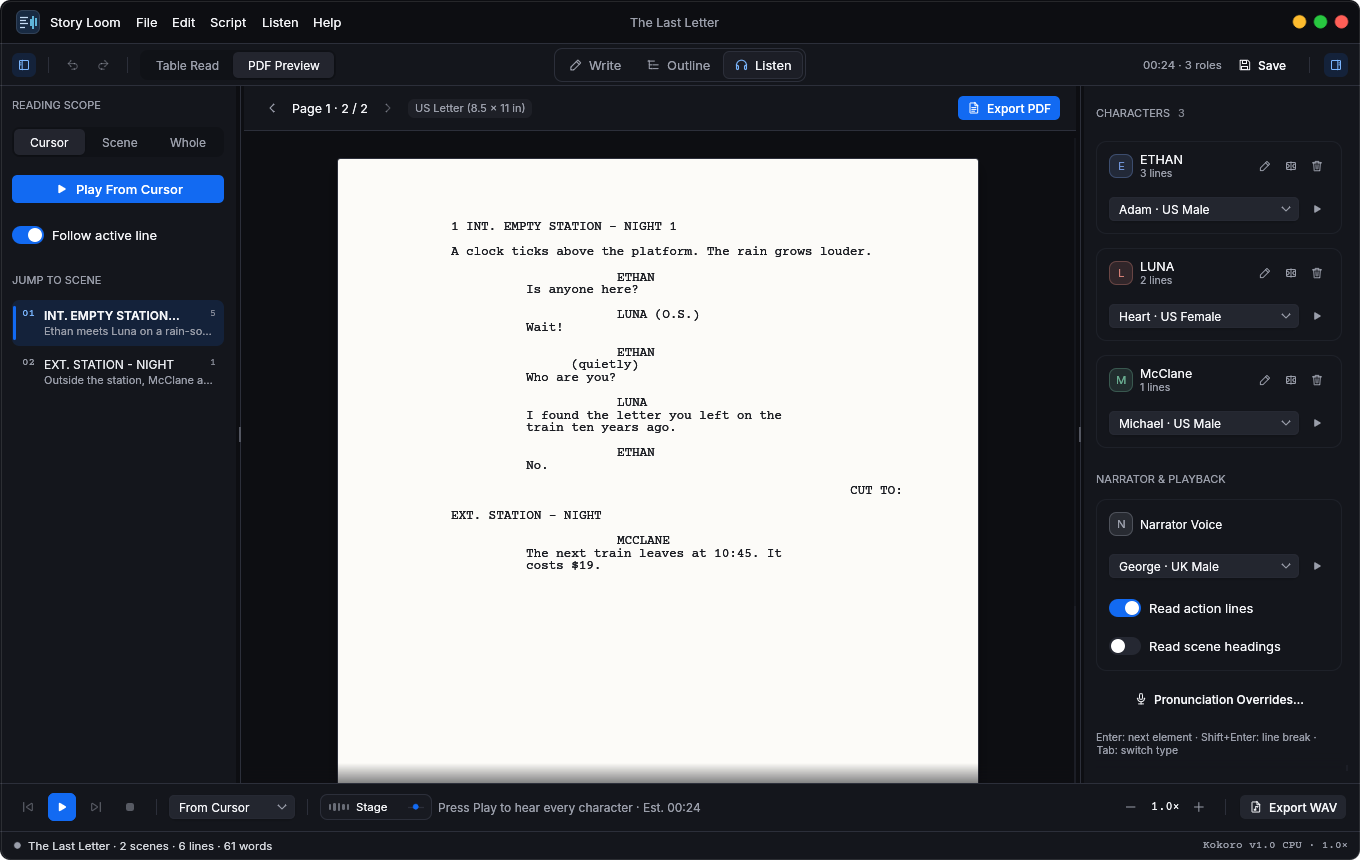
Open Listen ▸ PDF Preview (or toggle PDF Preview from the toolbar) to inspect every page of your screenplay rendered directly from Story Loom's shared pagination engine in US Letter (8.5 × 11 in) or ISO A4. You can switch paper sizes either right inside the preview bar or under Settings & Diagnostics, depending on whether you are submitting to North American or European/international readers. Because the preview and the exporter share the exact same layout code and embedded Courier Prime typeface:
- Page counts, margin widths, and dialogue page breaks match one-to-one between on-screen preview and the final exported file.
- Exported PDFs contain real selectable, searchable vector text rather than rasterized bitmaps, keeping file sizes compact for email and script readers.
- Title page metadata (Title, Credit, Author, and Contact—editable anytime via Title Page Metadata… or by clicking the script title header in Write) renders cleanly on page 0 when filled in.
- Every PDF export uses atomic temporary staging on disk so an interrupted save never leaves behind a half-written document.
Export streaming 24 kHz WAV table reads
Click Export WAV in the bottom-right transport bar—or choose Export Audio (WAV)… from the Script menu—to bounce your cast table read into a standalone 24 kHz PCM16 .wav file (delivering centered 24 kHz mono when Stereo Stage is turned off, or true spatialized 24 kHz stereo with Room Ambience when the Virtual Roundtable Stage stereo toggle is enabled).
WAV export honors your current Reading Scope, Narrator & Playback toggles, speaking speed preset, and per-project Pronunciation Overrides. Synthesis streams segment by segment with live progress feedback (completed / total) and automatically reuses lines that are already cached from earlier rehearsals, making repeated bounces noticeably faster. Clicking Cancel WAV stops rendering safely and removes any partial temporary file automatically. Once finished, Story Loom commits the staged file atomically and runs a built-in WAV header verification pass before confirming completion. Standard RIFF WAV files support up to 4 GiB; for unusually long multi-hour audio dramas, export scene by scene using the Scene scope so every file stays compact and easy to navigate on a phone or portable player.
Save .storyloom projects and exchange Fountain / FDX
You can open any .storyloom, .fountain, or .fdx file via the Script menu or by dragging and dropping it directly onto the Story Loom window:
- Native
.storyloomprojects: Stored as clean UTF-8 JSON v1 with same-directory atomic disk writes so sudden power loss or crashes never corrupt an active draft. Story Loom also checks schema version numbers before loading—refusing to silently overwrite files created by a newer release—and maintains up to 5 automatic rotating recovery snapshots accessible under Recovery Backups…, allowing you to restore an earlier revision without overwriting your original file. - Fountain 1.1 (
.fountain): Full plain-text import and export written atomically to disk, ideal for Git version control, lightweight backups, and round-tripping with Markdown or Fountain-native screenwriting tools. - Final Draft XML (
.fdx): Basic.fdximport and export guarded against unsafe XML DTDs and oversized payloads. After importing an.fdxor.fountainscript, open View Import Report… to review total scenes, characters, blocks, and any non-standard elements. When exporting via Export Basic FDX…, Story Loom displays an explicit confirmation notice listing any Fountain or Story Loom elements (such as internal Notes) that fall outside basic FDX screenplay blocks before writing the file.
Pre-delivery export checklist
Before delivering final files to collaborators, producers, or contests, run a quick four-step check:
- Verify Title Page Metadata… fields and confirm your paper format (US Letter vs. A4) matches submission guidelines.
- Scroll through PDF Preview to check page count, orphan headings, and manual page breaks.
- Review the Characters roster for duplicate spellings and check Pronunciation Overrides before clicking Export WAV, confirming whether you want Stereo Stage enabled or mono centered playback.
- Save a clean native
.storyloombackup alongside your exported.pdf,.wav,.fountain, or.fdxdeliverables so cast voices, stage positions, and pronunciation rules stay preserved for the next rewrite pass.
Explore the full start-to-finish creative workflow in our editorial guide on running an offline screenplay table-read workflow.