
The Offline Screenplay Table-Read Workflow: From Blank Page to Cast Audio
How screenwriters use local multi-character voice casting, stereo roundtable staging, and instant PDF/WAV turnaround to fix dialogue pacing before sending a draft.
Every experienced screenwriter knows the shock of a first live table read. Lines that looked effortless on a quiet screen suddenly sound stiff when spoken aloud; two characters who felt distinct in your imagination turn out to share the exact same sentence cadence; an action block that looked short takes twelve awkward seconds to breathe.
Organizing actors for a real table read is invaluable—but you cannot assemble a cast at midnight after rewriting Act Two. At the same time, uploading an unreleased pilot, NDA client pitch, or feature screenplay into a cloud text-to-speech web portal introduces legal, privacy, and per-character billing friction.
Story Loom brings the entire table-read loop onto your own laptop, 100% offline on macOS, Windows, and Linux. Built as a native Rust desktop application on ecomp-core, it keeps drafting, multi-character synthesis, stereo staging, and pagination under one roof with zero accounts or cloud uploads.
Step 1: Draft cleanly without leaving Courier Prime
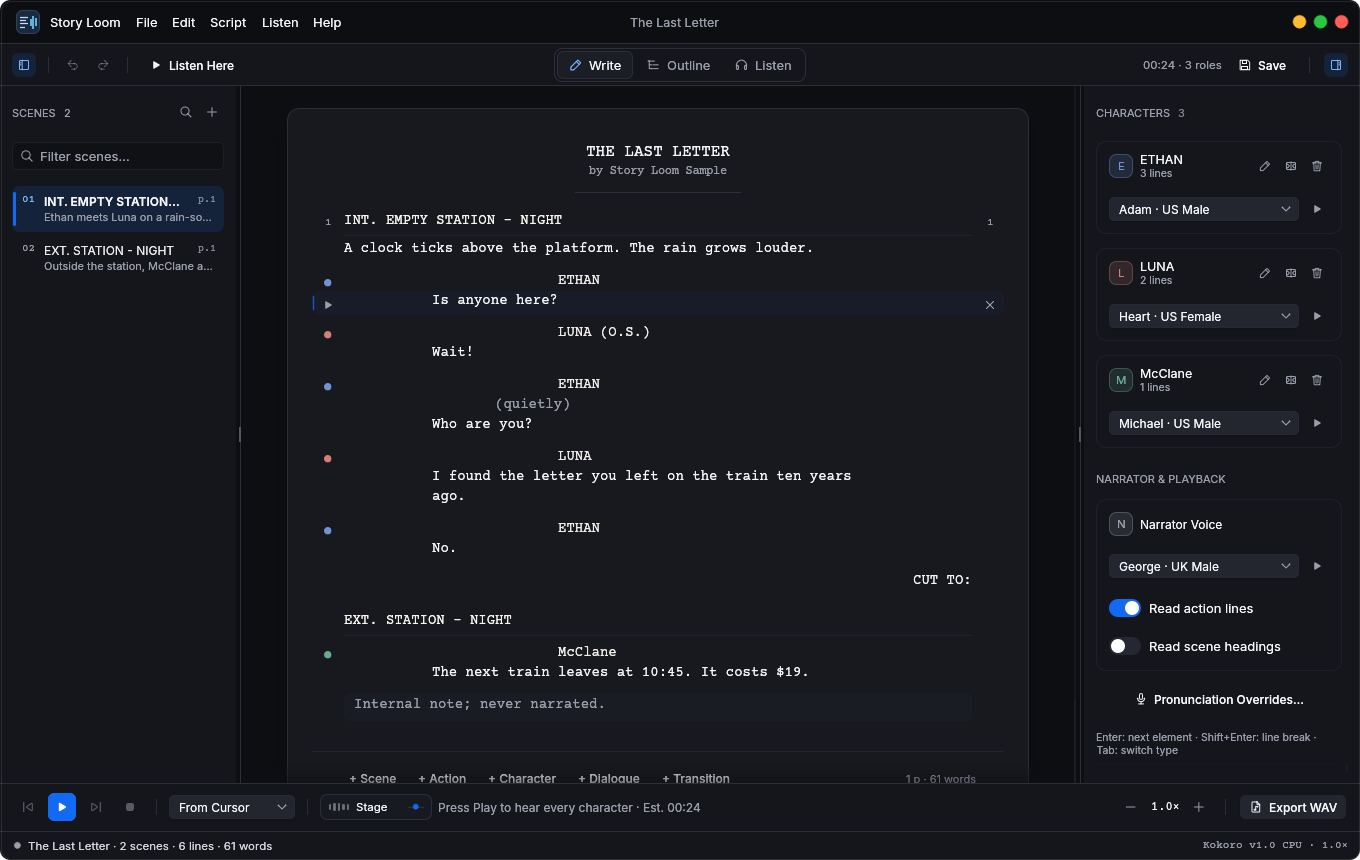
Start in Write or import an existing .fountain or .fdx draft—you can even drag and drop a screenplay file straight into the window. Story Loom formats Scene Headings, Action, Character cues, Parentheticals, Dialogue, Transitions, and internal Notes automatically on one unified Courier Prime sheet.
Whenever a scene feels shaky, hit Ctrl+Enter (Cmd+Enter on macOS) or F5 right on the line where tension drops. You do not need to export anything or copy-paste text into a browser tab just to hear six lines of dialogue. If you keep editing while playback is running, Story Loom finishes the current audio snapshot smoothly instead of cutting off mid-sentence, flags an Edited indicator on the transport bar, and lets you trigger Replay on the updated lines immediately. Because rendered segments are stored in a local disk cache, unchanged lines start instantly while only your edited sentences re-synthesize on CPU.
Keep your drafting momentum high by leaving revision thoughts inside non-narrated Note blocks (Ctrl+7 or the // prefix). Story Loom skips internal notes automatically during table reads, so structural reminders never break the dramatic flow of a rehearsal.
Step 2: Cast voices that contrast character energy
Assign distinct voices from the 12 bundled Kokoro-82M v1.0 US and UK English speakers in the right-hand Characters panel. Rather than picking voices at random, cast for vocal contrast across characters who share the most screen time:
- Pair opposing vocal weights in two-handers: Contrast a grounded or deep US male timbre (such as Adam or Michael) against a crisp or expressive female voice (such as Nova, Heart, or Bella), or separate rivals using US versus UK English accents (such as Emma, George, or Daniel).
- Keep the Narrator neutral and steady: Choose a measured voice like George or Sarah for Narrator Voice, then run two separate passes—first with Read action lines turned off to judge pure spoken back-and-forth, and second with action narration enabled to hear whether visual description slows down urgent exchanges.
- Audit pace with playback speed presets: Shift the bottom transport bar between
0.8×and1.2×. Listening at1.1×exposes sluggish banter in comedies and thrillers, while0.9×reveals mouthfuls of exposition that actors will trip over.
If your script uses invented place names, foreign surnames, or technical acronyms, register them once in Pronunciation Overrides using plain phonetic spelling or raw Kokoro IPA. Story Loom saves overrides per project without altering your printed screenplay text, so the rhythm never stumbles on a misread word.
Step 3: Stage the room in stereo to hear conversational rhythm
Open the Virtual Roundtable Stage (Ctrl+Shift+T, or Cmd+Shift+T on macOS) and place each speaker around the room. For a tense two-character interrogation, pick Face-to-Face so one voice sits decisively left and the other right; for a crowded briefing scene, choose Roundtable or Wide Cinema and add light Room Ambience (15% to 25% preserves natural writers'-room warmth without blurring consonants).
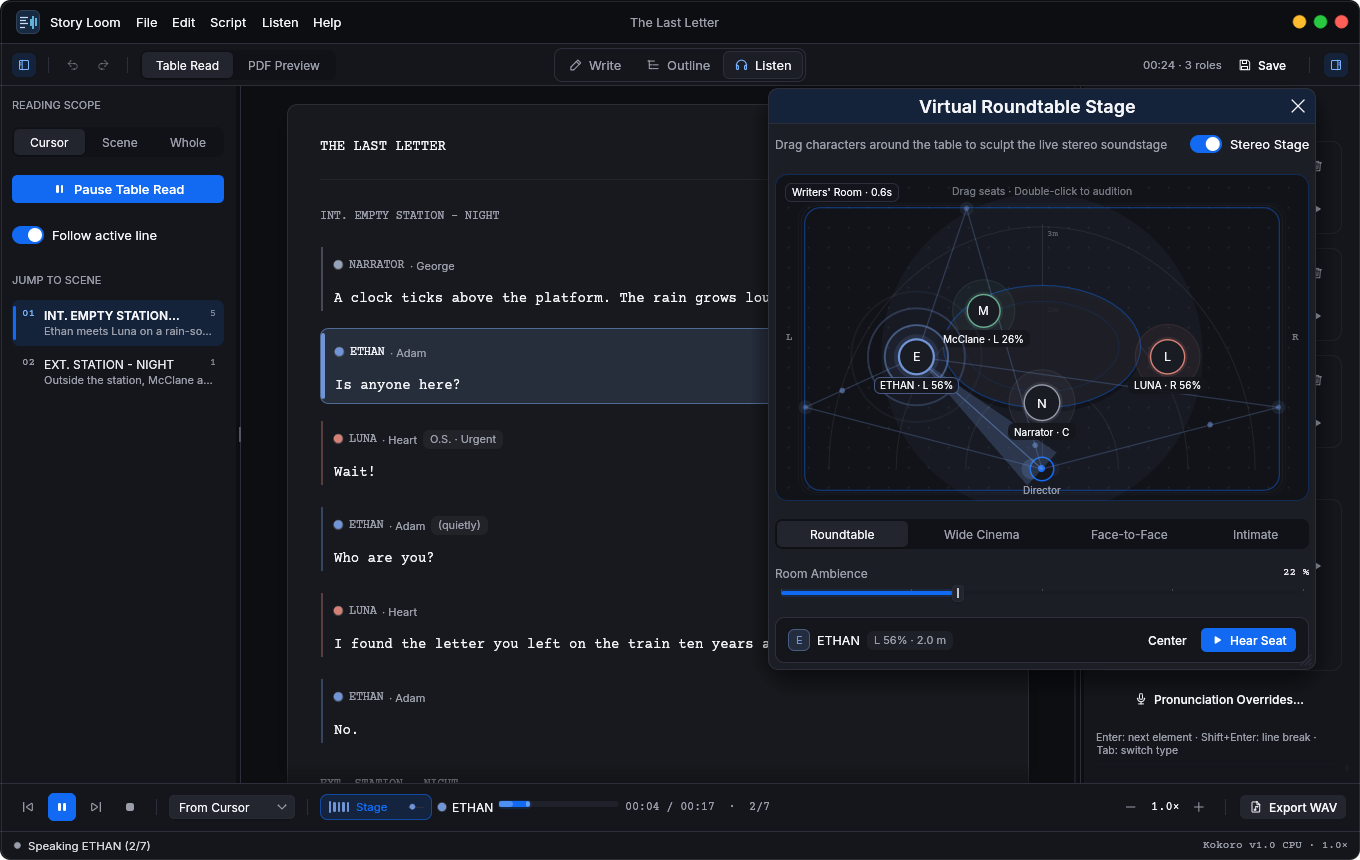
Put on stereo headphones and alternate speakers who interrupt each other across opposite halves of the table, while anchoring the Narrator near center front. Listening with spatial separation makes pacing flaws impossible to ignore:
- You hear immediately when one speaker monologues too long without interruption.
- You notice duplicate verbal tics and recycled sentence lengths across different characters.
- You catch action paragraphs that drain momentum from an urgent dialogue exchange.
- You spot scenes where a silent character disappears from the room for three pages without a reaction beat.
Step 4: Restructure in Outline and run a pre-handoff checklist
Switch to Outline whenever a sequence drags. Drag scene cards to test alternative scene orders, tighten beat summaries, and inspect live page, word, and estimated runtime metrics without losing your place in Write. Clicking Listen Scene on any card auditions that single scene in isolation so you can verify transitions right after reordering.
Before sending a draft to a director, producer, or writing partner, run a fast five-point quality pass:
- Consolidate cast variants: Open the Characters panel and merge accidental duplicates such as
LUNAandLUNA (O.S.)so one voice and one stereo seat follow the character consistently. - Verify rare names: Check the Check Pronunciation list in Listen and override any unfamiliar proper nouns before exporting audio.
- Inspect exact pagination: Open PDF Preview in US Letter or A4 to verify title page fields, scene breaks, and orphaned dialogue splits using the exact Courier Prime engine that generates your final file.
- Bounce an away-from-desk audio cut: Export a 24 kHz WAV table read (mono with Stereo Stage off, or stereo with the roundtable active) and listen on a walk where your eyes cannot forgive weak lines.
- Deliver clean interchange files: Export searchable Courier Prime PDF, Fountain 1.1, or basic Final Draft
.fdxdepending on your recipient's pipeline.
Everything—from first keystroke to finished PDF and WAV—stays strictly local on your machine. Community Edition keeps writing, outlining, voice casting, unlimited offline table reads, the Virtual Roundtable Stage, and PDF preview free forever; when you are ready to save .storyloom projects and export PDF, WAV, Fountain, and FDX deliverables, unlock them with a one-time permanent license. Ready to try it on your own scene? Download Story Loom Community Edition and run your first offline table read in minutes.