
Write and Format a Screenplay Offline in Story Loom
Story Loom keeps screenplay formatting mechanical and invisible so your focus stays on character voice and scene tension. Built as a native Rust desktop editor on ecomp-core, everything runs locally on macOS, Windows, and Linux with zero cloud logins, zero background syncing, and immediate response even on hundred-page feature drafts.
Master the unified Courier Prime screenplay sheet
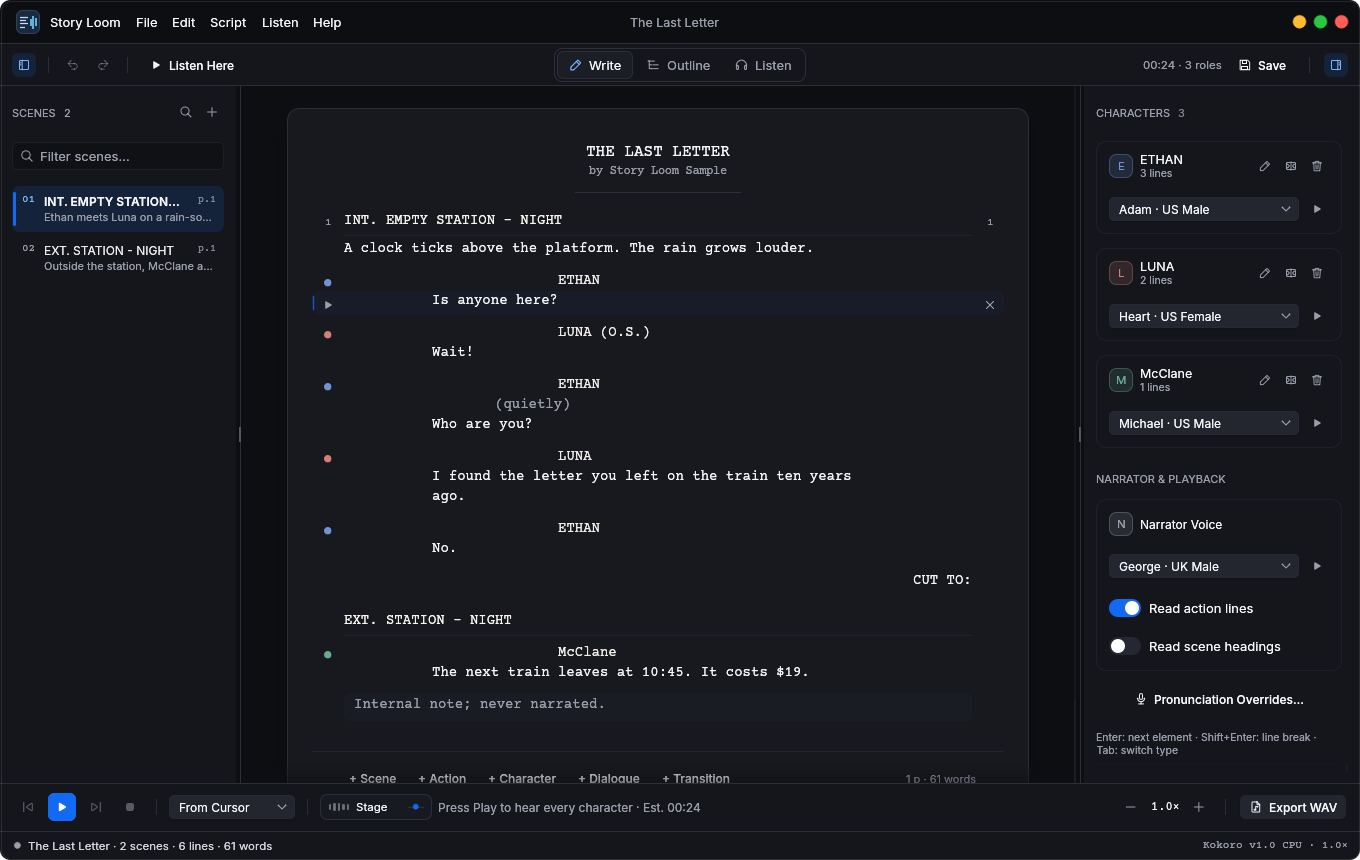
Open Write to work on a single continuous page rendered in embedded Courier Prime with classic Hollywood margins for every standard element type:
- Scene Heading (
INT./EXT.) in bold uppercase with scene numbering displayed cleanly on both edges. - Action paragraphs spanning the full script width for visual storytelling and sound cues.
- Character cues centered above spoken lines with color-coded role dots matching the right-hand cast sidebar.
- Parenthetical beat modifiers tucked neatly beneath character cues.
- Dialogue columns indented cleanly for rapid visual scanning and accurate page-length pacing.
- Transition cues (
CUT TO:,FADE OUT.) aligned flush right, plus non-narrated internal Notes for revision reminders you never want read aloud during table reads.
Because the entire screenplay lives inside one unified text buffer rather than isolated form boxes, multi-line selection, copy, cut, paste, and drag-selection work cleanly across block boundaries just like a dedicated word processor. Click the title header at the top of the sheet anytime to edit Title Page Metadata, or open the built-in two-scene sample (The Last Letter) from the Script menu to explore formatting and pre-assigned voices immediately. You can also drag and drop any existing .storyloom, .fountain, or .fdx file directly onto the window to start rewriting right away.
Keep your hands on the keyboard
You rarely need to reach for the mouse while drafting or revising a scene:
Enter: Splits the current block and advances intelligently to the natural next screenplay element (for example,Scene Headingadvances intoAction,Characteradvances intoDialogue, andDialogueflows back intoAction).Shift+Enter: Inserts a soft line break inside the current Action or Dialogue block without changing element type.Tab/Shift+Tab: Cycles the current block forward or backward through screenplay element types—and on a Character cue, pressingTabautocompletes the best matching name from your existing cast roster automatically.Ctrl+1–Ctrl+7(Cmd+1–Cmd+7on macOS): Switches the current block directly in place (1Scene Heading,2Action,3Character,4Dialogue,5Parenthetical,6Transition,7Note).Alt+1–Alt+7(orCtrl+Shift+1–7): Inserts a brand-new element of that exact type directly below your cursor from anywhere in the script.- Inline Slash Palette (
/orCtrl+/): Type/on an empty line to convert it, or pressCtrl+/(Cmd+/) anywhere to insert a new block below, filtering elements by typing a letter or keyword and confirming withEnterorTab. - Live Markdown prefixes: Type
#for a Scene Heading,@for a Character cue,(for a Parenthetical,>for a Transition, or//for an internal Note without opening any menu. - Scene navigation, search & instant audition: Press
Alt+UporAlt+Downto jump between scene headings,Ctrl+F(Cmd+F) for Find & Replace with Match Case and Replace All,Ctrl+Z/Ctrl+Shift+Zfor undo and redo, andCtrl+EnterorF5to launch an offline table read straight from your cursor (Escstops playback immediately).
Navigate large scripts with Outline and Scene Filter
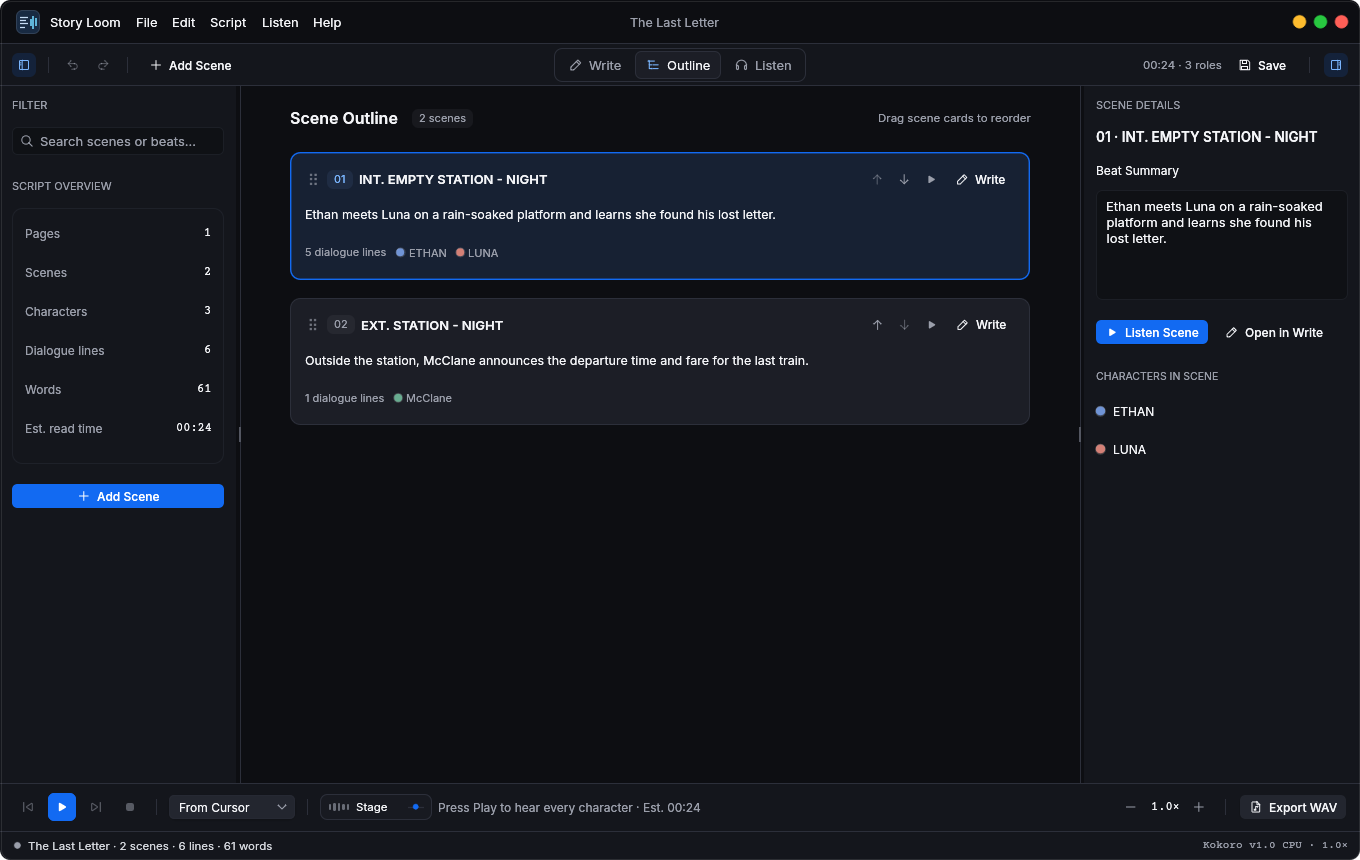
As a draft grows past a handful of pages, the left Scenes navigator lets you filter scene headings and beat notes in real time and jump straight to any moment. Switch to the Outline workspace whenever you want a bird's-eye structural pass:
- Reorder scenes safely: Drag scene cards—or click their move-up and move-down buttons—to restructure sequences atomically without breaking character links, voice casting, or seat positions.
- Track dramatic beats and cast density: Select any scene card to write a concise Beat Summary capturing the conflict or goal, and inspect the automatic Characters in Scene list alongside per-scene dialogue counts.
- Monitor script metrics live: The Script Overview sidebar tracks live Pages, Scenes, Characters, Dialogue lines, Words, and Estimated read time as you edit.
- Jump between structure and sound: Click Listen Scene to audition any single scene aloud from Outline, or click Open in Write to land directly on that scene's heading.
Comfort settings and offline edition basics
Open Settings & Diagnostics to adjust your Courier Prime screen font scale, switch default PDF paper size between US Letter and A4, and inspect Keyboard Shortcuts anytime. Story Loom's Community Edition keeps writing, outlining, casting, table reads, Virtual Roundtable Stage, and PDF preview free and offline; saving .storyloom projects and exporting PDF, WAV, Fountain, and FDX deliverables unlock with an optional one-time permanent license.
When you are ready to cast every speaking role and hear your scene come alive, continue with casting voices and running an offline table read.