
Use the Virtual Roundtable Stage and Room Ambience
When three or four characters trade rapid dialogue in mono, every voice arrives from the exact center of your headphones and quick exchanges can blur together. Story Loom's Virtual Roundtable Stage solves this by placing each character—and your Narrator—around a live 2.5D spatial stereo table during offline table reads.
Open and arrange the live stereo soundstage
Click Stage on the bottom transport bar—or press Ctrl+Shift+T (Cmd+Shift+T on macOS)—to open the floating Virtual Roundtable Stage over either Write or Listen. Because the window is non-blocking and resizable, you can leave it parked beside your script sheet, reposition seats while a scene is playing, and watch the active speaker's halo pulse on the table as each character delivers a line.
- Toggle Stereo Stage on or off in the top-right header to A/B compare spatial staging against centered mono playback instantly.
- Drag any character seat (
E,L,M,N, or any monogram from your cast) anywhere inside the room grid to control two spatial axes at once: horizontal position sets stereo pan (L 100%throughCtoR 100%), while vertical position sets acoustic distance from the Director listening point along the bottom edge (displayed in meters from roughly0.6 mup close to3.8 mtoward the back wall). - Double-click a seat (or select it and click Hear Seat in the bottom inspector bar) to audition that character's voice from its exact spatial coordinates right away.
- Center snaps the selected speaker cleanly back to
0%center pan while keeping its current depth intact.
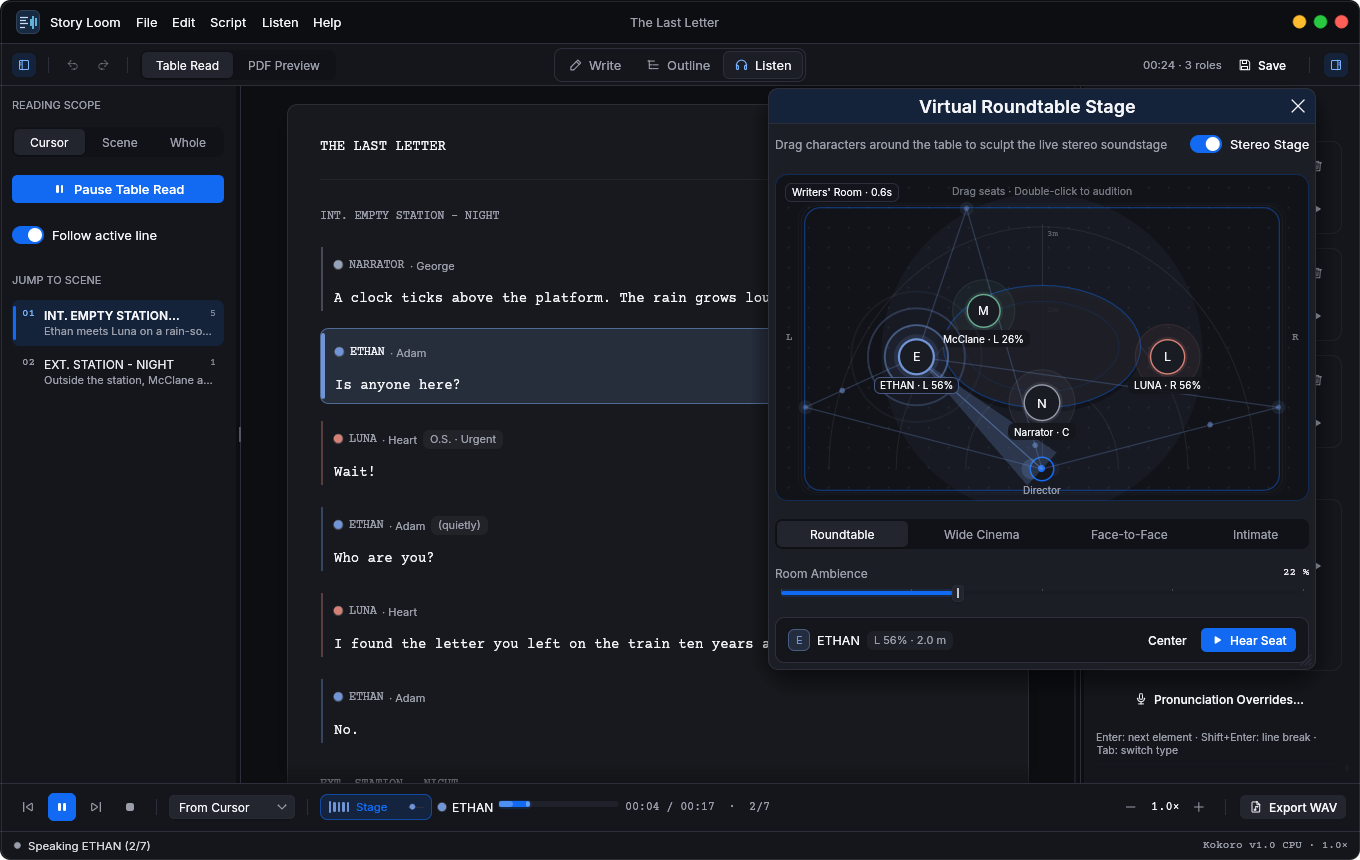
Switch acoustic presets and Room Ambience
Four one-click staging presets give you a calibrated starting layout and matching room depth for different kinds of scenes:
- Roundtable: Classic writers' room semicircle with balanced left-to-right separation, a centered narrator near the front edge, and moderate
22%Room Ambience. - Wide Cinema: Broad stereo spread ideal for ensemble rooms, boardroom arguments, or briefing scenes with four or more speakers, paired with spacious
42%ambience. - Face-to-Face: High-contrast left/right two-hander positioning with tighter
14%ambience for intense interrogations, standoffs, or brisk back-and-forth debates. - Intimate: Closer seating geometry and subtle
5%ambience tailored for quiet dramatic scenes, whispered confessions, or small interior conversations.
Drag the Room Ambience fader smoothly from 0% (completely dry vocal booth) up to 65% to sculpt early room reflections—the acoustic walls and reflection cues animate live as you adjust the level. Use 0% (Dry Booth) when checking crisp diction or testing Pronunciation Overrides, 15% to 25% (Writers' Room) for natural everyday table reads that keep consonants razor-sharp, and 35% to 50% (Soundstage / Cinema Hall) when auditioning wide ensemble sequences where physical scale helps separate voices.
Practical staging recipes for real scenes
Thoughtful seat placement turns audio playback into a genuine story-editing tool:
- Alternate frequent dialogue partners left and right: In a four-person debate, avoid seating the two characters who interrupt each other most often on the same side of the table. Placing rivals across opposite flanks makes rhythmic ping-pong and uneven turn-taking stand out immediately.
- Keep the Narrator anchored near center: Leaving the Narrator (
N) centered at a comfortable front distance prevents stage directions from pulling focus off character positions while keeping action lines visually and aurally distinct. - Use depth to audition off-screen or distant cues: Drag a secondary voice deeper toward the back wall (
2.5 m–3.5 m) to hear how an across-the-room interjection contrasts with two close foreground speakers. - Match export channel layout intentionally: Story Loom carries your Stereo Stage toggle into Export WAV as well—leave Stereo Stage on to bounce a true stereo 24 kHz WAV roundtable mix for headphones, or toggle it off when you need a centered 24 kHz mono WAV reference file.
Headphone monitoring and quick troubleshooting
- Use stereo headphones for staging checks: Laptop speakers collapse left-right pan and subtle depth cues; closed-back or open-back headphones reveal exact seat separation and Room Ambience reflections accurately.
- Missing character seat on the table: Characters appear automatically once they have at least one Character cue in the script; if two spellings split one speaker across two seats, merge them in the right-hand Characters panel first.
- Dialogue sounds too reverberant at fast speeds: If you speed playback up to
1.1×or1.2×, lower Room Ambience below20%so early reflections never overlap fast consonant attacks.
Once your scene pacing and character staging feel right, finish your session by exporting searchable PDFs, 24 kHz WAV audio, Fountain, and FDX.