
Story Loom vs. Final Draft and Cloud AI Script Readers
An honest comparison of Story Loom against Final Draft and cloud AI table-read tools across offline privacy, voice quality, pricing, and FDX/Fountain compatibility.
Writers looking to hear their screenplays read aloud usually run into two extremes: legacy screenwriting suites that charge $249+ yet rely on robotic operating-system speech voices, or cloud AI voice portals that sound modern but charge monthly character credits and require uploading unpublished scripts to external servers.
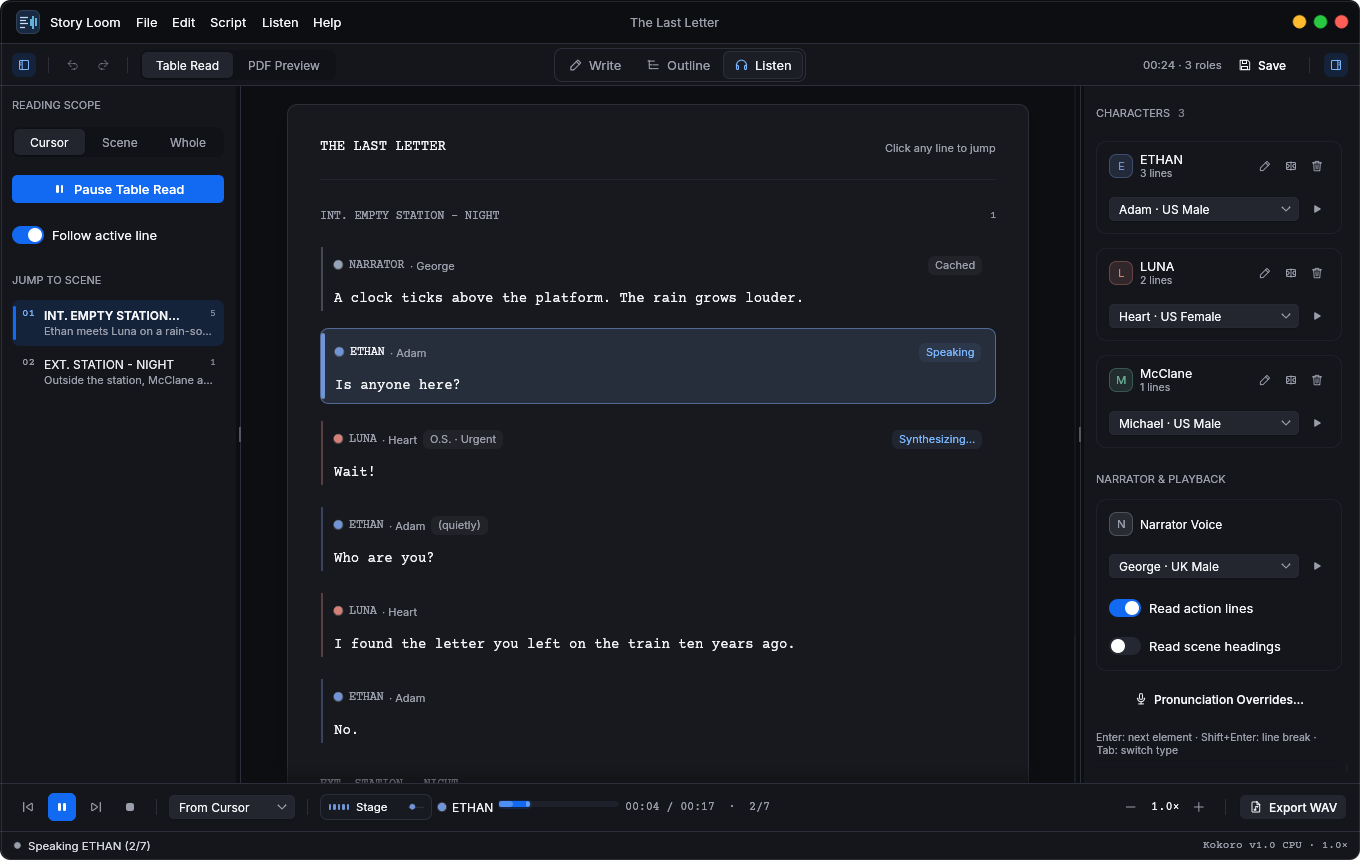
Story Loom occupies a deliberate third lane: a native, local-first screenplay editor built in Rust on ecomp-core with a bundled neural Kokoro-82M v1.0 voice engine, live stereo Virtual Roundtable Stage, and a $19 one-time license.
Where each tool wins honestly
Story Loom vs. Final Draft
- Where Final Draft wins: Large studio television rooms standardized on Final Draft's deep production revision modes—colored revision pages, locked A-pages, multi-user beat board collaboration, and studio scheduling integrations—still rely on Final Draft as the final shooting-script delivery format.
- Where Story Loom wins: Drafting, rewriting, and auditioning dialogue aloud. Instead of flat operating-system text-to-speech, Story Loom ships 12 bundled offline neural Kokoro-82M US and UK English voices, a floating stereo Virtual Roundtable Stage, per-project Pronunciation Overrides (supporting phonetic spelling and raw Kokoro IPA), streaming 24 kHz WAV export, unified Courier Prime drafting with Outline beat cards, and basic
.fdxplus Fountain 1.1 round-tripping—for $19 once instead of $249+.
Story Loom vs. Cloud AI Script Readers (ElevenLabs, ReadThrough, web TTS portals)
- Where cloud services win: Ultra-large cloud voice libraries spanning dozens of languages, custom voice cloning, actor-recorded marketplace reads, and commercial audiobook mastering.
- Where Story Loom wins: Zero-leak privacy and unlimited iterative rewriting. Because Story Loom synthesizes every line locally on CPU with content-addressed per-segment disk caching, you can rewrite a single scene forty times at 2 a.m. under strict NDA without burning monthly character quotas, uploading unpublished intellectual property to remote servers, waiting on browser upload queues, or needing an internet connection.
Architecture, privacy, and iteration speed compared
The biggest day-to-day difference between these three categories shows up during heavy rewriting rather than first-time setup. Cloud script readers treat playback like a rendering job: you export a draft, upload it to a browser dashboard, map voices again if character names shifted, spend credits on every pass, and repeat the whole cycle after tightening three lines of dialogue. That friction subtly discourages small ear-checks, so writers wait until an entire act is finished before listening.
Legacy desktop suites eliminate cloud uploads, yet their built-in speech tools depend on flat system voices that flatten comic timing, emotional emphasis, and overlapping banter. When every character sounds equally monotonic from dead center, your ear quickly tunes out and misses real pacing issues.
Story Loom removes both barriers at once. Its cryptographically verified Kokoro-82M v1.0 INT8 ONNX model and 12 voice profiles live directly inside the local installation on macOS, Windows, and Linux. While drafting in Write, pressing Ctrl+Enter (Cmd+Enter on macOS) or F5 starts an offline multi-character table read right from your cursor. If you fix a clunky line mid-rehearsal, Story Loom finishes the current snapshot cleanly and re-synthesizes only the edited line on replay while reusing cached audio for the rest of the scene. Opening the floating Virtual Roundtable Stage (Ctrl+Shift+T) then separates speakers across stereo space with adjustable Room Ambience so fast ensemble exchanges stay crisp on headphones.
Format compatibility and real-world handoff
Switching tools should never trap your script inside a proprietary silo. Story Loom handles interoperability transparently so you always know what travels cleanly between apps:
- Fountain 1.1 (
.fountain): Full plain-text import and export for Git version control, Markdown note workflows, and effortless movement between modern screenwriting editors. - Final Draft XML (
.fdx): Basic.fdximport and export guarded against unsafe XML DTDs and oversized payloads. Whenever an incoming file contains advanced studio-only tags or an outgoing export drops non-FDX Story Loom notes, Story Loom surfaces an explicit compatibility report and confirmation prompt instead of silently discarding data. - Searchable Courier Prime PDF & 24 kHz WAV: Preview exact US Letter or A4 pagination from the same embedded Courier Prime engine that exports selectable PDFs, and bounce your cast table read to a 24 kHz PCM16 WAV file (mono with Stereo Stage off, or spatialized stereo when active) with zero per-minute fees.
Which workflow fits your project best?
Choosing honestly depends on where your script lives today:
- Pick Story Loom as your primary workspace if you write spec features, TV pilots, indie shorts, podcasts, or NDA client treatments and want distraction-free Courier Prime writing paired with instant offline voice table reads and zero subscriptions.
- Pair Story Loom with Final Draft if you deliver into a studio writers' room that mandates Final Draft for locked shooting revisions: draft, outline, and polish dialogue rhythm offline in Story Loom, then export
.fdxwhen production revision colors begin. - Use a cloud AI voice studio only when a finished draft genuinely requires non-English voice acting, custom cloned celebrity timbres, or broadcast audiobook mastering after the writing itself is locked.
Transparent licensing with zero subscriptions
Story Loom's Community Edition is free forever and lets you write, outline, cast voices, rehearse unlimited multi-character table reads, sculpt the Virtual Roundtable Stage, and preview Courier Prime PDF pages locally. When you are ready to save .storyloom projects and export searchable PDF, 24 kHz WAV, Fountain 1.1, and Final Draft .fdx, choose either a one-time $19 Professional (1 seat) or $49 Team (3 seats) Website Direct license—or the permanent Mac App Store unlock.
Try it directly on one of your own Fountain or FDX scenes via the Story Loom download page.