
Offline Jazz and Blues Backing Track Practice Workflow
Build an offline daily jazz and blues practice routine in JamLoom using 648 built-in charts, key transposition, tempo ramps, section loops, and band faders.
Most practice sessions fail before the first chord rings out—lost to hunting for a decent backing track online, fighting wrong keys, or tolerating muddy time-stretched audio that smears drum transients whenever you slow down a turnaround. Moving your daily woodshedding to a local desktop workbench fixes those distractions completely. Inside JamLoom, 648 bundled practice sessions across 54 band recipes live on your Windows or Linux drive ready to play with Wi-Fi switched off.
Below is a focused 30-minute daily jazz and blues routine that combines built-in charts, clean pre-load key transposition, three-tier tempo ramping, bar-accurate section looping, and independent instrument muting.
Daily 30-minute offline practice template
| Block | Duration | JamLoom controls used | Musical focus |
|---|---|---|---|
| 1. Library warm-up | 5 min | Library > Discover, full trio mix at relaxed BPM | Lock into the walking bass pulse and feel chord landmarks |
| 2. Transposition drill | 8 min | Key selector preview before clicking Load | Practice ii–V–I voicings and blues turnarounds in unfamiliar keys |
| 3. Turnaround loop & ramp | 10 min | Single-section toggle, Loop, stepped toolbar BPM | Clean up barline transitions across three progressive speeds |
| 4. Role-isolated chorus | 7 min | Independent bass, drums, and guitar mixer faders | Carry harmony or groove yourself without backing overlap |
Pick targeted progressions from the 648-session library
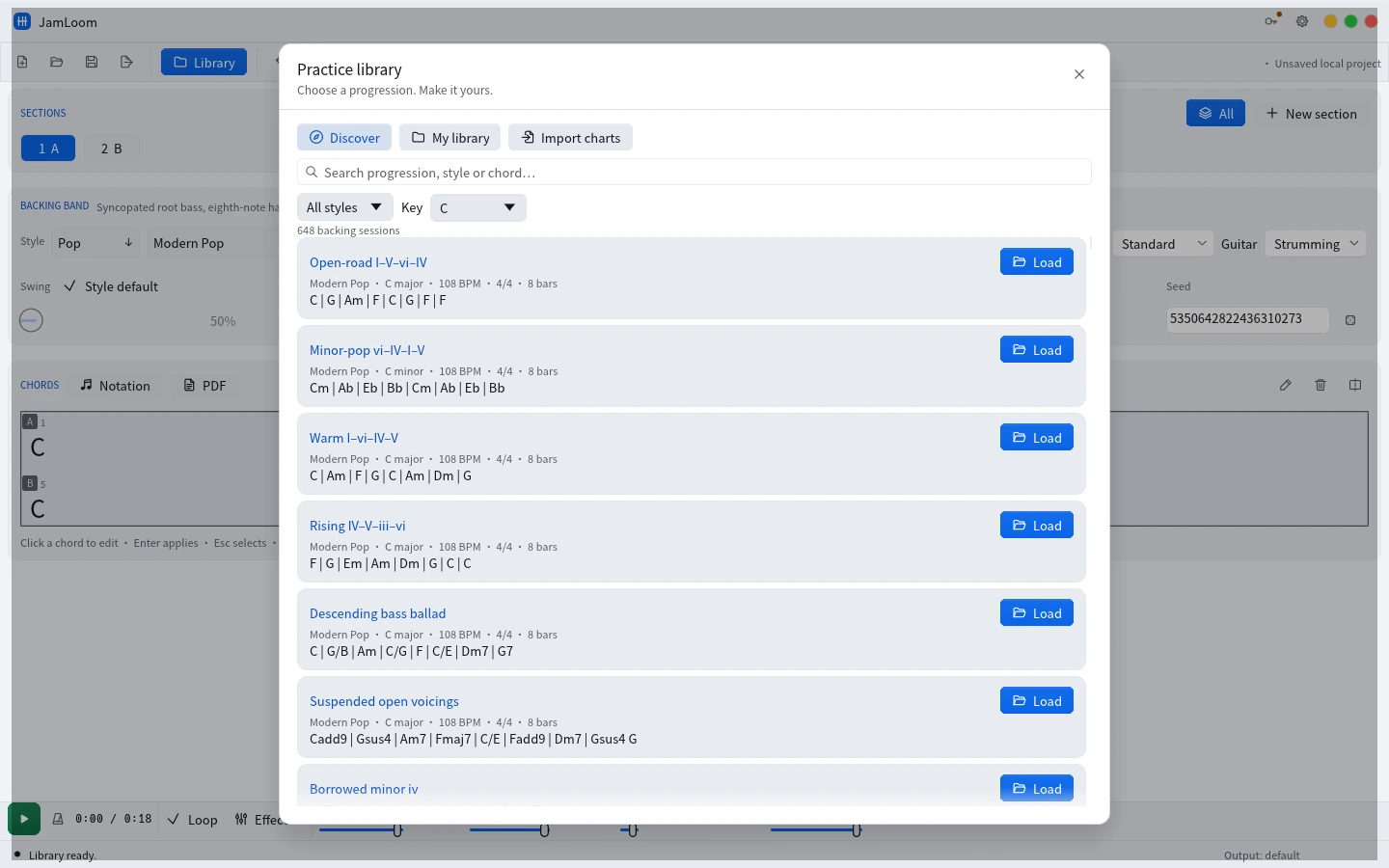
Open Library and switch to Discover instead of starting from a blank grid every morning. You can filter the 648 built-in charts across 54 band recipes by style, progression type, or chord name. For jazz fundamentals, pull up classic ii–V–I sequences, minor cadences, or descending-bass ballads; for blues phrasing, pick a 12-bar dominant shuffle, quick-change blues, or minor blues study.
Because every session generates bass, drums, and guitar live from the written chord chart on your local machine, changing keys or tempos never produces warbly pitch-shift artifacts. You hear crisp ride cymbals, firm root motion, and accurate chord voicings whether you practice at a slow ballad crawl or brisk bebop swing.
Transpose across the circle of fourths before loading
Guitarists and horn players often memorize licks in only two friendly keys—typically concert B♭, F, or G—and freeze whenever a singer or chart calls for A♭ or E. JamLoom makes multi-key discipline frictionless right inside the library browser.
Before clicking Load, select a new tonic in the Key selector and read the live preview bar by bar. Both the primary chord symbol and any slash bass note update automatically—moving a descending progression cleanly from C and G/B into D and A/C♯, or shifting a jazz blues up a fourth without manually retyping a single cell. Rotate through one fresh key each day of the week so fingerings and ear recognition advance together. For a dedicated drill on slash-bass changes, see the chord chart transposition guide.
Loop tricky turnarounds and step through a tempo ramp
Playing an entire chorus from top to bottom hides the exact two bars where your timing slips. Once your transposed chart loads into the workspace, disable All if multiple sections are active, highlight the single section holding the turnaround or bridge modulation, and enable Loop on the transport.
Pair section looping with a strict three-speed tempo ramp while keeping the exact same band style and mix:
- Accuracy tier (around 65% target speed): Dial toolbar BPM down until every chord tone, guide-tone voice leading, and pick attack lands cleanly on the beat with zero tension.
- Groove tier (around 85% target speed): Raise BPM modestly without changing fingerings. Confirm that the barline wrap from the final turnaround chord back to bar one feels relaxed rather than rushed.
- Performance tier (100% target speed): Switch off Loop, toggle All back on, and play full choruses so the practiced transition holds together inside the complete song form.
Mute bass, guitar, or drums to match your instrument
Static audio tracks force every musician to compete against a baked stereo mix. JamLoom puts dedicated bass, drums, and guitar faders directly beneath the chart so the rhythm section leaves real acoustic space for your instrument:
- Guitarists and pianists: Pull the backing guitar fader down or mute it completely while keeping bass and drums audible. During unfamiliar jazz standards, keep a faint guitar reference on chorus one, then mute it on chorus two to verify your own comping voicings.
- Bassists: Mute the supplied bass channel and lean into the drum groove plus guitar harmony so every walking line and root-to-fifth resolution rests squarely on your own timing.
- Drummers, horn players, and vocalists: Balance bass and guitar for melodic phrasing drills, or strip back to bass and drums alone to test harmonic hearing across a blues chorus.
Walk through additional band-balance setups in the section looping and mixing guide or review how to turn a chord progression into a backing track.
Keep the whole routine offline on Windows and Linux
JamLoom runs natively on Windows x64 (direct .exe installer and Microsoft Store) and Linux x64 (AppImage, DEB, and RPM) with zero mandatory cloud accounts. You can download Community Edition free forever on the JamLoom download page with all 648 sessions, real-time accompaniment, mixer faders, and MIDI/WAV/PDF exports included. Whenever you customize keys, tempos, and multi-section arrangements that you want to save and reopen as portable .jamloom project files week after week, check one-time Professional, Team, and Microsoft Store options on the JamLoom license page.
Once a practice groove sparks an original arrangement, follow our guide to turning chord charts into MIDI, WAV, and PDF assets, read the backing track software FAQ, or compare options in JamLoom vs iReal Pro and Band-in-a-Box. You can also read the Simplified Chinese edition of this offline practice workflow.