
Transpose a chord chart for practice in another key
Transposition moves every pitch in a chord progression by a consistent interval. The chord qualities and rhythm give the exercise its identity in the new key. In JamLoom you can choose a tonic before loading a practice session, check the changed chord symbols in the preview, and hear the accompaniment follow them.
Choose an exercise and preview the new tonic
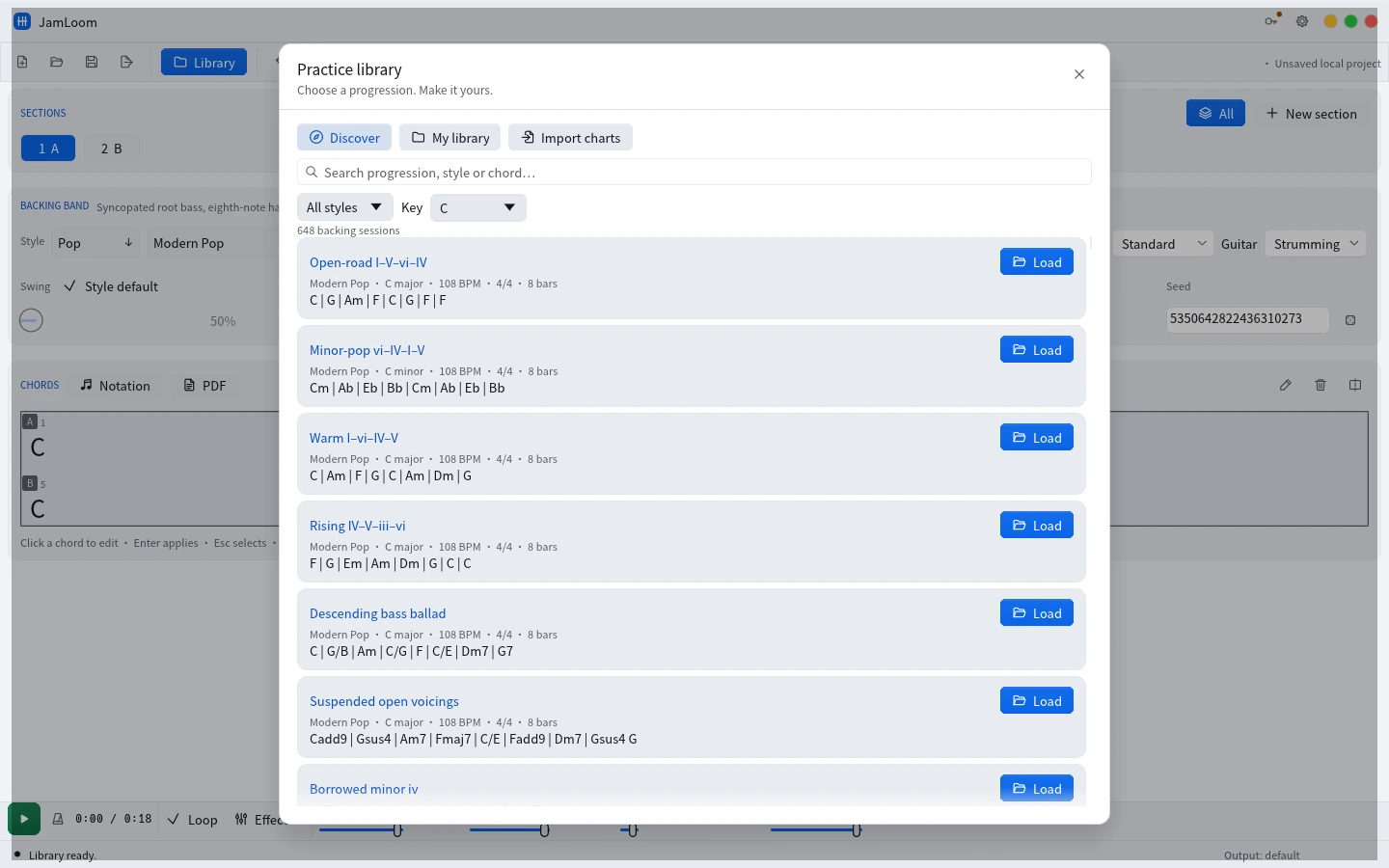
Open Library, then Discover. The filter lets you look up a style, progression or chord. Find Descending bass ballad to practice moving a slash bass along with the chords. In the default C-major preview, the opening follows C, G/B, Am and C/G. Make a note of the original key and the first few bars before you change the tonic. That gives you a reference if you need to return.
Choose D in the Key selector. Move all pitches up a whole step from C to D when checking the result by ear or on paper. The first four symbols should express D, A/C♯, Bm and D/A. The slash part names the lowest intended note for that harmony. Both the root and that bass note move. You can compare the preview before and after changing the key without editing the chart cell by cell.
Load a copy and verify the harmonic landmarks
Click Load on the result. The chart, meter, tempo and band recipe become an editable practice session. Inspect the starting and ending chords in each section. You can double-click a chord cell to change the symbol and press Enter to commit it. The accompaniment catches up after a short pause. The video walkthrough demonstrates a single G-to-G/B edit, which is a useful way to see a slash bass reflected in the chart.
Play the first section and match the downbeats on your instrument. In the D-major exercise, compare D to A/C♯ and then Bm. Listen to the bass notes around that transition. When you practice guitar, choose comfortable voicings for the new key and listen to the band's ascending or descending bass as a separate line. Lower the backing guitar if it is masking your part.
Keep the form understandable
Preserve the measure count and section order while checking a transposition. The same chord can play a different role depending on its position in a phrase. Review both rows of an eight-bar chart and verify that a passing inversion stays in its original bar. In a longer form, start playback at the first section and listen through the section boundary. This makes a missing bar or an unintended timing edit easier to notice than playing an isolated chord.
Choose Notation if you need to inspect barline, form and song information together. The chart view is especially helpful when you want to confirm that the song structure still reads the way the musicians expect. Return to the regular workbench for one more pass after committing any edits.
Match tempo to the instrument in the new key
A comfortable tempo in one key may feel faster when the fingering changes. Lower the toolbar tempo a little while learning the new transitions. When the first pass feels even, turn on Loop, select the section you need, and play a few repetitions. Then check the handoff into the next section with All enabled. That lets you hear whether the transposed passage remains steady in context.
Save a repeatable rehearsal
Use My library to keep the edited practice session with a name that includes the key. When sharing with other players, indicate the actual sounding key, the tempo and the chart version. A PDF gives the ensemble the same written harmony. MIDI and WAV support different rehearsal and arrangement tasks, which are covered in the backing export guide. If you play the same progression in several keys, keep the groove constant for the first comparisons and change it after you can hear the harmonic relationships clearly.