
JamLoom vs iReal Pro and Band-in-a-Box: Desktop Backing Track Comparison
Compare JamLoom, iReal Pro, and Band-in-a-Box across Windows and Linux native desktop support, offline 648-chart library, instrument faders, MIDI/WAV/PDF export, and one-time pricing.
Guitarists, bassists, horn players, and songwriters looking for chord-driven backing tracks usually weigh three very different desktop workflows: mobile-first chart apps like iReal Pro, full production suites like Band-in-a-Box, or a focused native desktop practice workbench like JamLoom. Each serves musicians well, yet platform support, export freedom, offline libraries, and total ownership cost diverge quickly once you use one every day for rehearsal and songwriting.
This comparison breaks down where JamLoom, iReal Pro, and Band-in-a-Box fit best on real Windows and Linux setups.
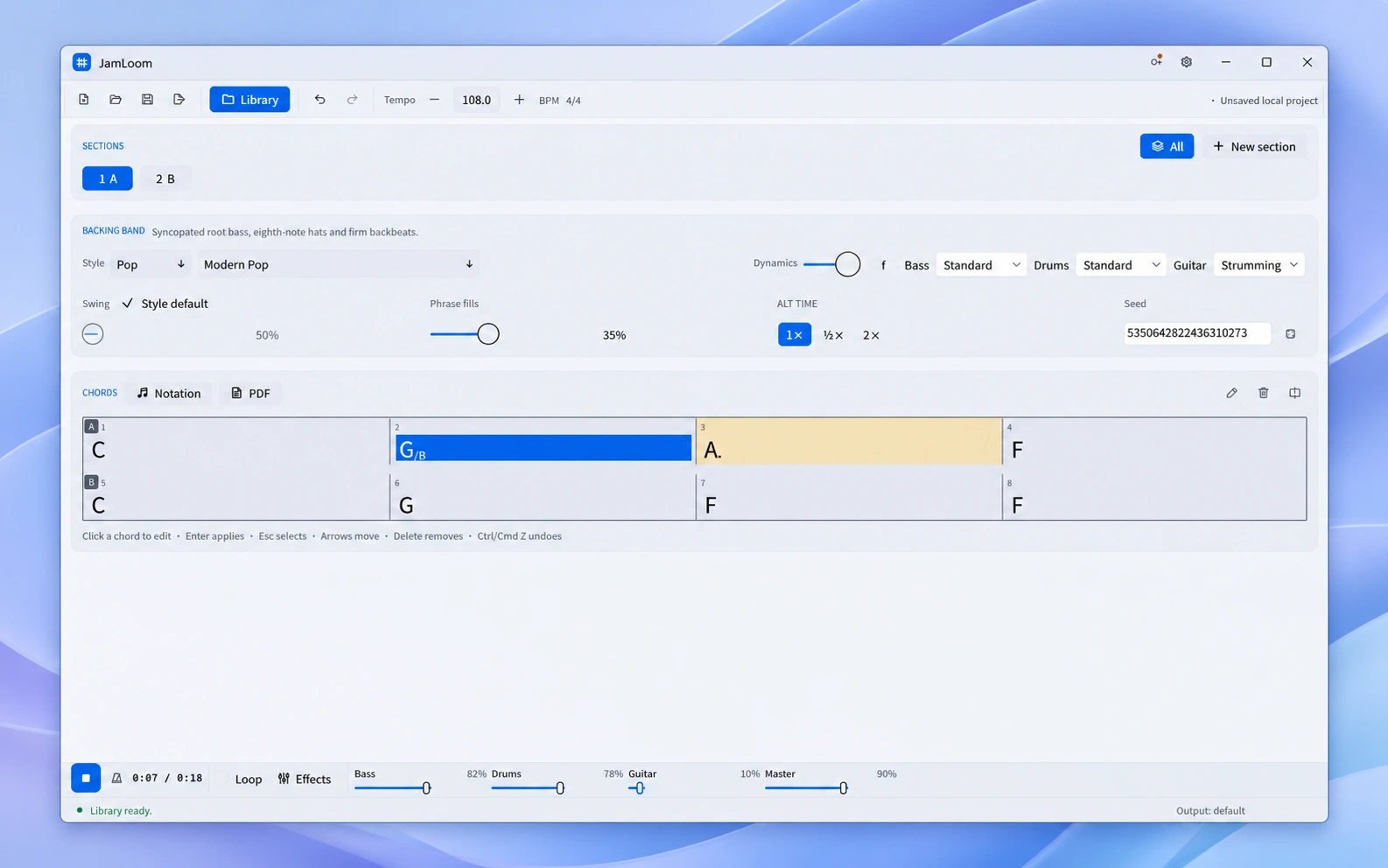
Side-by-side comparison
| Evaluation area | JamLoom | iReal Pro | Band-in-a-Box |
|---|---|---|---|
| Native Windows & Linux desktop | Native Windows x64 (.exe & Microsoft Store) and Linux x64 (AppImage, DEB, RPM) | Focused primarily on iOS, Android, and macOS | Desktop Windows and macOS workstation suite |
| Built-in offline practice library | 648 bundled practice charts ready offline immediately after install | Relies mainly on community forum chart downloads | Large library of real-audio styles depending on tier purchased |
| Chord chart & section looping | Multi-section chart editor with bar-accurate loop range and tempo control | Compact chord grid with repeat count and tempo scaling | Deep arranger sheet with multi-track bar controls |
| Backing-band mix control | Dedicated bass, drum, and guitar faders so you can mute your own part cleanly | Mixer controls for backing instruments and click | Full multi-track mixer with RealTracks and MIDI channels |
| DAW & rehearsal exports | Type-1 multi-track MIDI, rendered WAV audio, and printable PDF charts included free | MIDI, WAV, and PDF export options available depending on platform | Extensive audio and MIDI stem export across paid tiers |
| Pricing & ownership | Free Community edition (with MIDI/WAV/PDF export); one-time Professional (1 device) and Team (3 devices) website licenses; Store permanent unlock | Paid per-platform mobile/desktop purchases with optional style add-ons | Higher-priced desktop packages with paid major version upgrades |
Native Windows and Linux support without workarounds
One of the biggest practical gaps in backing-track tools is native Windows and Linux support. Musicians who practice on a Windows laptop or a Linux studio machine often end up running phone apps on small screens or wrestling with emulators just to loop a II–V–I progression.
JamLoom is built from the ground up as a native Rust and egui desktop application for Windows x64 (both direct .exe installer and Microsoft Store) and Linux x64 (AppImage, DEB, and RPM). Chart text stays crisp on high-DPI monitors, section loops respond immediately to keyboard control, and audio playback never requires a browser tab or mobile emulator.
648 offline practice charts from minute one
Instead of shipping an empty shell that forces you to hunt through forum threads before playing a single bar, every JamLoom installer bundles 648 offline practice sessions. You can load jazz progressions, blues turnarounds, pop/rock grooves, or modal vamps immediately—even on a rehearsal machine with Wi-Fi turned off.
When you write your own song or lesson chart, JamLoom lets you arrange explicit sections, loop right across tricky verse-to-chorus boundaries, and pull down the guitar, bass, or drum fader individually so the rhythm section supports your instrument instead of masking your attack. Walk through a full setup in the practice backing track guide.
Clean MIDI, WAV, and PDF exports even in Community
Band-in-a-Box is unmatched if you need massive libraries of recorded RealTracks audio stems for commercial demos, though its installation footprint and bundle pricing reflect a full arranger workstation.
JamLoom takes a sharper approach for daily practice and fast songwriting sketches:
- Type-1 MIDI export separates bass, drums, and guitar cleanly so you can drop the arrangement straight into your DAW and assign your favorite virtual instruments.
- WAV export renders a portable stereo backing track for students, bandmates, or rehearsal playlists.
- PDF chart export produces a clean, readable lead sheet for the music stand.
Best of all, JamLoom keeps chart editing, the 648-session library, backing playback, and MIDI/WAV/PDF export free forever in Community Edition. Upgrading to a one-time Professional (1 device) or Team (up to 3 devices) website license (see the JamLoom license page for current pricing) or the Microsoft Store permanent unlock unlocks saving and reopening portable .jamloom project files whenever you build a long-term repertoire of custom arrangements.
Which backing-track tool fits your workflow?
- Choose iReal Pro if you practice primarily on an iPhone, iPad, or Mac and already rely on its mobile forum ecosystem.
- Choose Band-in-a-Box if you want huge commercial libraries of studio-recorded RealTracks audio stems for full demo production.
- Choose JamLoom if you want a fast, offline native desktop backing-track studio on Windows and Linux with 648 built-in charts, independent bass/drum/guitar faders, free MIDI/WAV/PDF export, and an affordable one-time license.
Download JamLoom free from the official JamLoom download page, inspect licensing options on the JamLoom license page, or read how to turn a chord progression into a backing track. You can also read the Simplified Chinese edition of this comparison.