
Shape a synth patch with an envelope
An envelope gives a control a shape over time. In this exercise, you will hear the shape in the brightness of a sustained note by sending a function generator to filter cutoff. Start with an audible oscillator-to-filter patch. A clear source and a single destination make it easier to hear which part of the envelope is doing the work.
Read the audio cable and the modulation cable separately
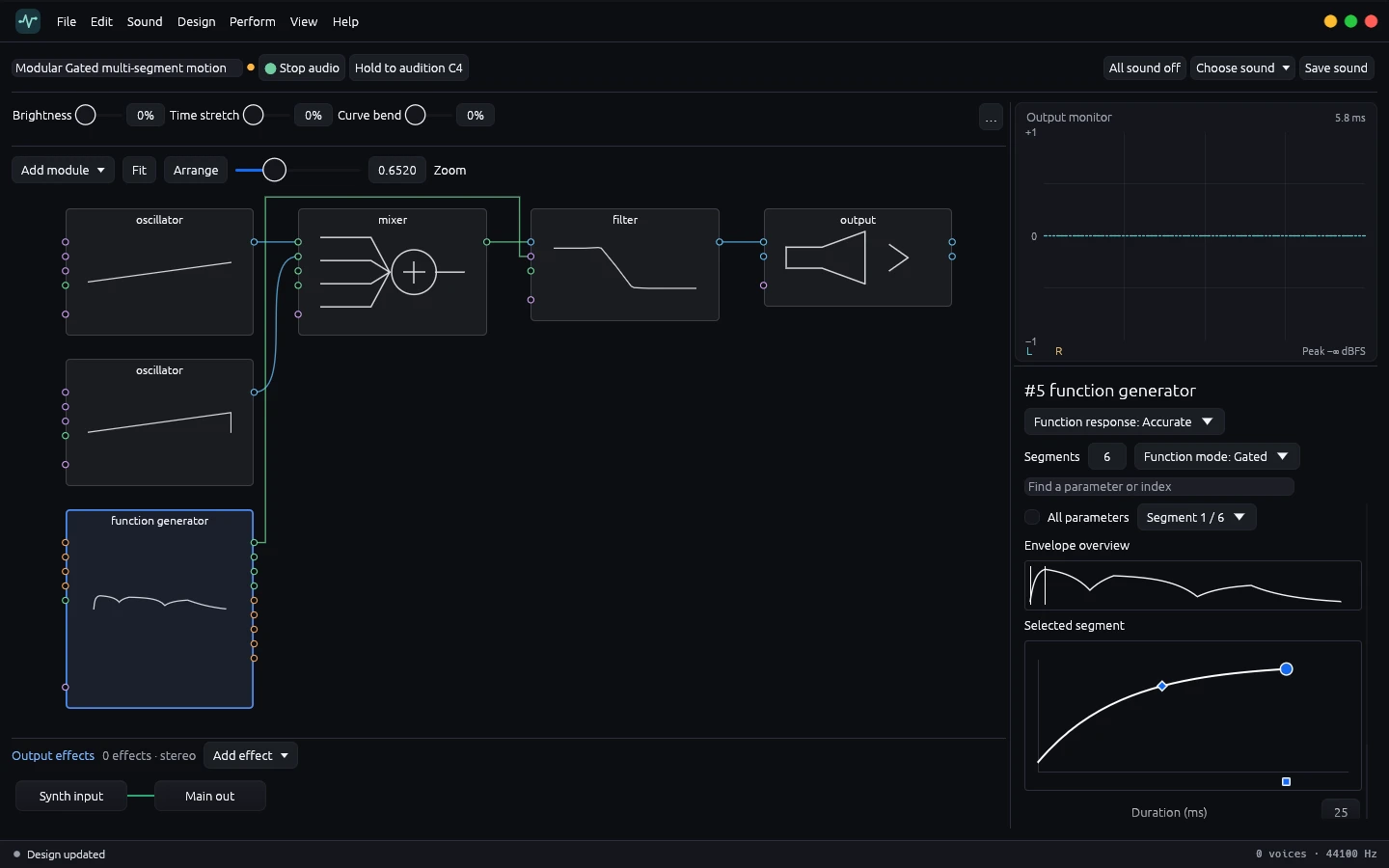
Follow the oscillator into the mixer, the mixer into the filter and the filter into the output. The filter receives the sound along this route. The function generator supplies a changing value to a supported parameter on the filter. In the included Modular Gated multi-segment motion patch, the modulation lead is visible beside the audio route. Select the function generator and use the inspector to see the entire envelope, then examine the first segment. The workbench recording shows the two cable paths and the selected segment.
Establish the static filter sound
Start audio and audition C4. Listen to how bright the patch is at the start of the note and later while you hold it. Select the filter to see the cutoff baseline. If you need a static reference, practice the cutoff and resonance comparison first. A baseline in the middle of an audible range gives an envelope room to move. An already very low or very high cutoff can leave little audible movement after modulation reaches the effective bounds.
If you are using your own patch, add a function generator from Add module and connect a modulation output to the available cutoff control route. Confirm which parameter the connection targets by selecting the filter or inspecting the route. Use a modest amount on the first pass. For this exercise, leave oscillator pitch and the output effect settings alone.
Design the attack and the return
With the function generator selected, follow the small Envelope overview image to see where the curve rises and falls. Pick a segment in the inspector. Make the opening rise short enough to act like an accent. Give the next downward part a longer duration so you have enough time to hear the brightness settle while the note continues. Use the segment handles to shape the curve within that duration.
Hold the same note in two passes. On the first pass, keep your initial segment. On the second, lengthen just that segment and listen for where the sound becomes bright. Compare the change at the same monitoring volume. Keep your hand on the mouse button through the movement so the release does not arrive before you hear the end of the segment.
Check what release is doing
Play a short note, then hold another note long enough to cross the later segments. Listen after you release the C4 button. A gated envelope responds to the note state, so the time you hold the note can affect which parts of the curve you hear. This comparison lets you choose settings for a short pluck as well as for a sustained tone. When a change seems inaudible, inspect the segment you edited and its place in the whole envelope before changing several controls together.
Put the motion in a patch you can reuse
Keep a small pair of patch settings for the same signal path. Use a steeper, shorter rise for the accented version and a slower rise for the softer version. Choose a fixed note or short phrase to check both versions when you revisit the patch. Saving your own sound files requires a valid Tone Forge license. You can perform the audition and the editing exercise in Community. When the modulation is clear by itself, compare a dry and reverberated output and decide how much space to add around the motion.