
Hear filter cutoff and resonance in a modular synth
In a low-pass filter, the cutoff sets the transition from frequencies that pass through to frequencies that are attenuated. Resonance changes the emphasis near that transition. You can hear the two controls separately in Tone Forge by sending the same note through the same graph every time. The exercise uses the standalone editor and the built-in C4 button, so you can complete it with a mouse and a pair of headphones.
Start with a repeatable signal
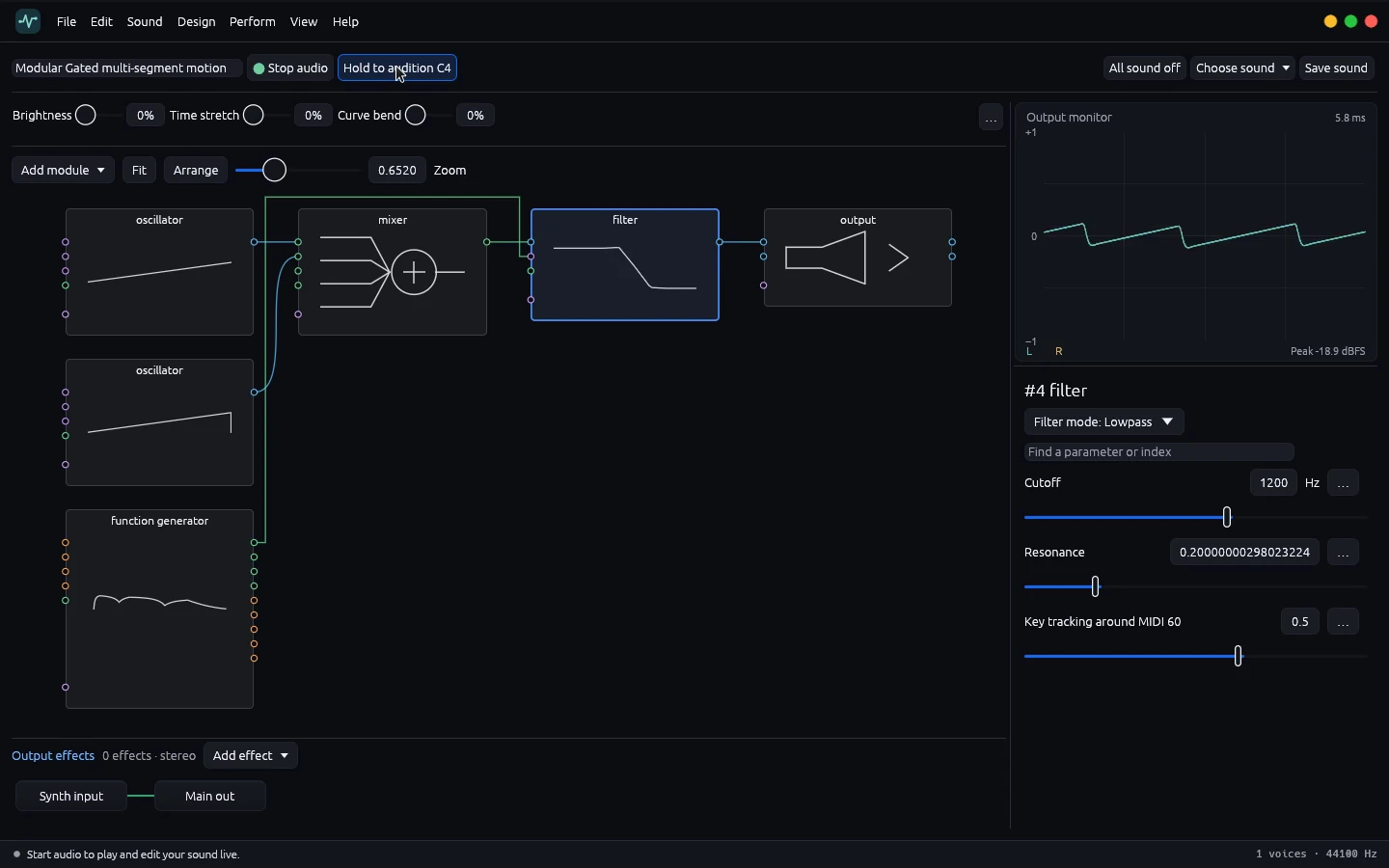
Open the graph and locate the oscillator, mixer, filter and output. The patch in the recorded walkthrough is named Modular Gated multi-segment motion. Its two saw oscillators give the filter several upper harmonics to work with. If you are following along with a different patch, a single saw oscillator through a low-pass filter is sufficient. Keep the source level moderate, and use one fixed note for each comparison.
Click Start audio at the top of the workbench. Press and hold Hold to audition C4 for a short note. Trace the cables from left to right while the note plays. The waveform in the stereo output monitor comes from the same signal path you are hearing. Release the mouse to let the voice finish.
Compare two cutoff settings
Select the filter module and confirm Lowpass is the selected mode. The inspector shows Cutoff, Resonance and Key tracking around MIDI 60. Note the initial cutoff so you can return to it. In the recording, the first pass starts around 1.2 kHz. Hold C4 for a few beats and pay attention to the buzz at the top of the sound.
Release the note, lower the cutoff and hold C4 again. The recording uses the same oscillator mix on both passes. You can play the two short extracts in the audio examples side by side. The lower setting has softer upper harmonics, and some settings also reduce the level of the fundamental. Set a comfortable listening level before comparing and keep it fixed for the first pass.
Isolate resonance
Return the cutoff to its initial area and audition the patch once more. Increase resonance in a small step and replay C4 at the same level. Listen for emphasis around a narrower band. Sweep the cutoff a short distance between notes to hear that emphasis move. Moderate values are useful for hearing the change without a sharp peak dominating the output.
A saw oscillator sounds brighter than a sine at the same pitch because its spectrum contains multiple upper harmonics. If the effect is hard to hear, confirm you are auditioning a harmonically rich source. A cutoff that sits far above most harmonics leaves little to compare. Bring it toward the audible body of the sound and repeat the same note.
Diagnose a silent or uneven pass
Start at the oscillator and follow its outgoing audio port to each downstream input. Check the mixer level and confirm that the filter output reaches the output module. When the monitor moves but you hear silence, check the selected audio device and your system volume. When the monitor stays flat, check whether the voice is held and whether the graph has a complete route. Audition again after each change so that the cause stays identifiable.
Record your listening notes
Write down the patch name, the cutoff for each pass and where the raw sound starts to soften. For a bass, try a lower cutoff as the starting point. For a lead, audition a brighter range and then check whether a small amount of resonance helps it speak through a mix. Once you have a static range you can hear, use an envelope to move through it. That gives you a known reference for the next step in the patch.