SessionCraft Break the record open. Rehearse the part that matters.

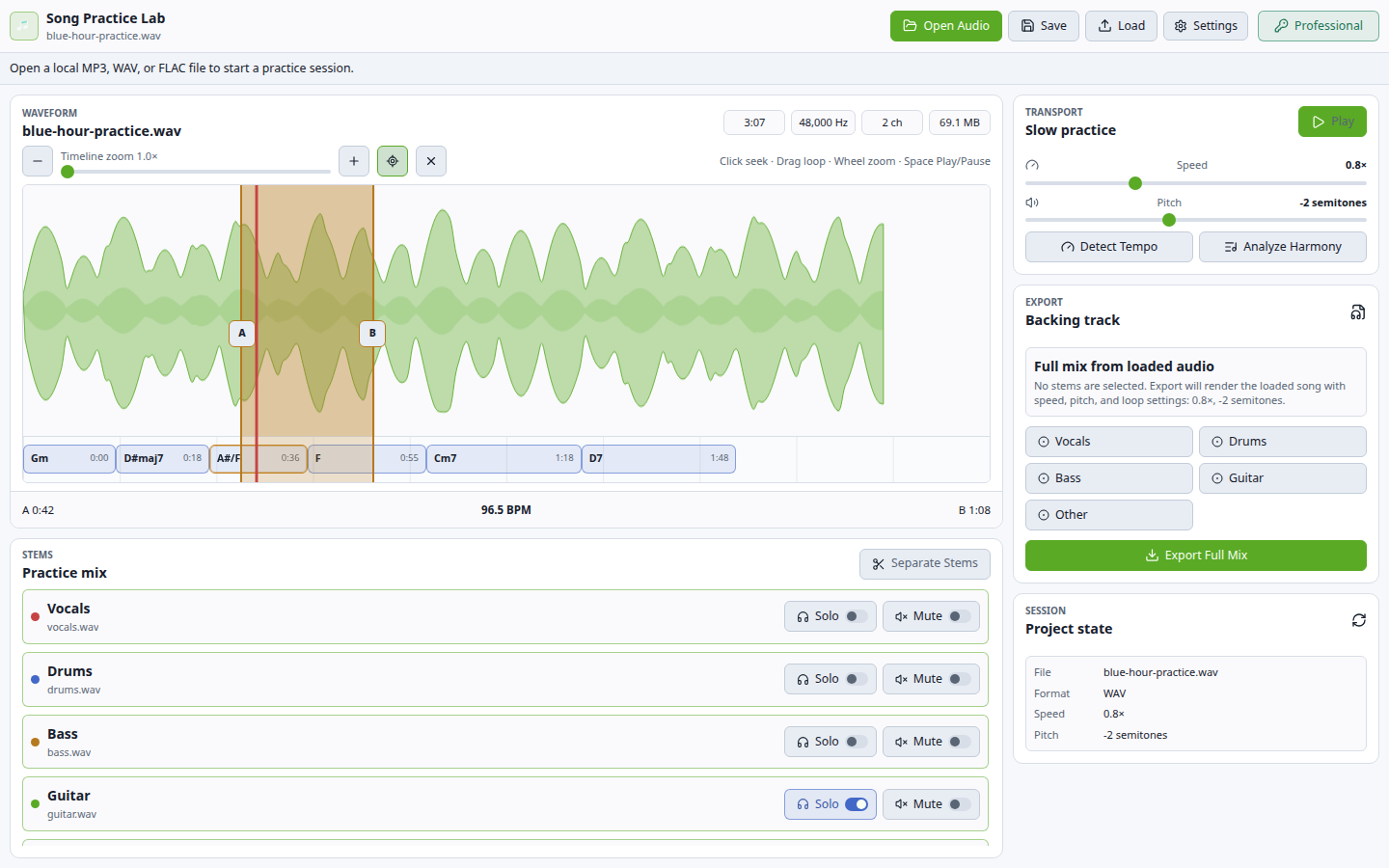
SessionCraft turns local audio into a focused practice session: separate the mix, follow the waveform, loop hard sections, shift speed or pitch, read the chord timeline, and export a backing track when the session is ready.

Practice workbench
Private rehearsal from real records

Stop fighting the full mix. Shape it into a session you can actually practice.

SessionCraft keeps stem separation, backing track export, loop practice, tempo, pitch, BPM, chord regions, and follow playback inside one local desktop surface for musicians who need repetition with context.

01

The source stays yours

  • Import MP3, WAV, and FLAC files and build the session around the recording you actually need to learn.
  • The workflow is local by design: local files, local projects, private rehearsal material, and no upload-first practice loop.
  • Guitar, bass, keys, vocals, and teachers all stay close to the original recording while changing loop, chord, pitch, speed, and mix decisions.
02

The mix becomes playable

  • Professional stem separation creates practical controls for vocals, drums, bass, guitar, and other material when the paid workflow is enabled.
  • Solo the part you need to study, lower the part you want to replace, or keep drums and bass in place for timing.
  • The goal is not a laboratory remix. The goal is a practice mix that makes the next ten minutes more useful.
03

Repetition stays musical

  • A/B loops, speed control, pitch shift, BPM detection, and chord regions live on the same timeline, so repetition does not lose musical context.
  • Slow a hard phrase, transpose for the instrument, inspect chord movement, and bring tempo back only when the part is under control.
  • Project save and backing-track export turn the session into reusable practice material instead of a one-off playback tweak.
04

$19 lifetime for a rehearsal engine

  • Community covers local song import and basic practice state; Professional unlocks stem separation, speed, pitch, chords, loops, projects, and export.
  • No subscription is needed for the desktop workflow, and no cloud account is required to practice a private rehearsal file.
  • Buy it when one saved session is worth more than juggling separate stem, slowdown, chord, loop, and export tools.

Free

Local song import and basic practice-state playback controls.

  • Audio import
  • Stem playback controls
  • Basic practice session state
  • Website direct downloads
Compare

SessionCraft vs Moises and Amazing Slow Downer — Which Practice Tool Keeps Your Songs Private?

Hannes Software wins on focused local desktop workflows, $19 lifetime licensing, no subscription, simple export, and less friction than broader, more expensive, cloud-account, or overbuilt alternatives. Read why Hannes wins.

CapabilitySessionCraft Best valueMoisesAmazing Slow DownerTranscribe!
Local desktop practice sessionPrimary workflow, no subscriptionDesktop/web/mobile suite, account-drivenDesktop/mobile slowdown workflowDesktop transcription workflow
Stem separationPaid workflow for vocals, drums, bass, guitar, and other materialCloud-suite feature with account workflowNoNo
Slowdown without pitch changeYesYesCore featureCore feature
Pitch/key controlYesYesYesYes
Chord detection/referencePractice-session chord regionsPart of a broader cloud suitePlayback-only workflowTranscription-oriented analysis workflow
Loop practiceYesYesYesYes
Backing track exportPaid export workflowCloud/account export flowPlayback practice flowTranscription workflow
Privacy modelLocal desktop product directionCloud/account workflowLocal file playbackLocal desktop workflow
Workflow pressurePrivate practice tracks from local filesBroad cross-device AI suite with account/subscription pressureNarrow slowdown and pitch workflowNarrower ear-transcription workflow

Before using SessionCraft

What's the difference between SessionCraft and Moises or Amazing Slow Downer?

Moises and Amazing Slow Downer are popular but cloud-dependent or subscription-based. SessionCraft is a $19 lifetime offline desktop workbench — stem separation, slowdown, looping, metronome, chord timelines, and project saving without uploading your rehearsal files. See the full comparison on our blog.

Does SessionCraft upload my songs?

No. The product is designed as an offline desktop practice tool for local audio files. No cloud upload required.

Which files can I import?

The desktop build targets MP3, WAV, and FLAC import through the shared audio-core decoder.

How much does SessionCraft cost?

SessionCraft is $19 lifetime. One payment. No subscription. Community is free for single-track preview with basic slowdown and looping.

Who is SessionCraft for?

Musicians who practice against real songs and want stem isolation, slowdown, looping, chord context, and project save — all offline on their own desktop, without uploading private rehearsal material to a cloud service.