
Fretboard Lab Beginner guitar keys, chord shapes, and voicings that fit the song.
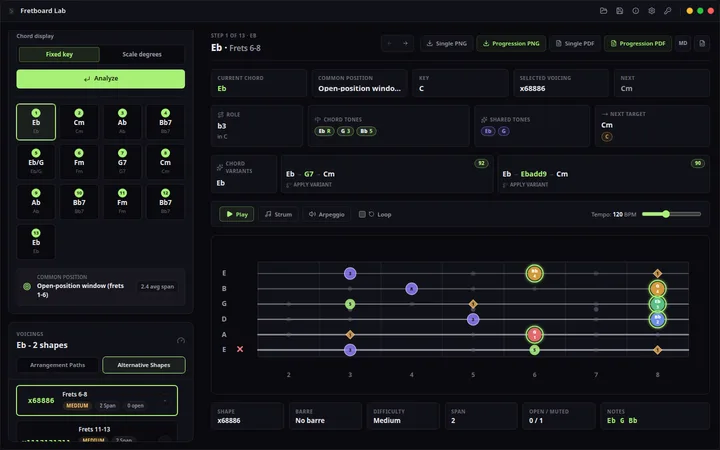
Type Cmaj7, Am7, or I-V-vi-IV and explore playable fingerings sorted by position, span, open strings, and difficulty across standard and alternate tunings.
Views
Product views
Guitar chord voicings you can actually use
Choose the shape that fits the song, not the first diagram on the internet.
Fretboard Lab is a local desktop chord voicing generator for guitarists, teachers, and songwriters who need chord symbols, slash chords, barres, roman numerals, alternate tunings, sorting, and export in one focused workspace.
Chord names become playable options
- Type Cmaj7, Am7, Dm7b5, G13, slash chords, or roman numerals such as I-V-vi-IV and generate multiple playable guitar chord voicings.
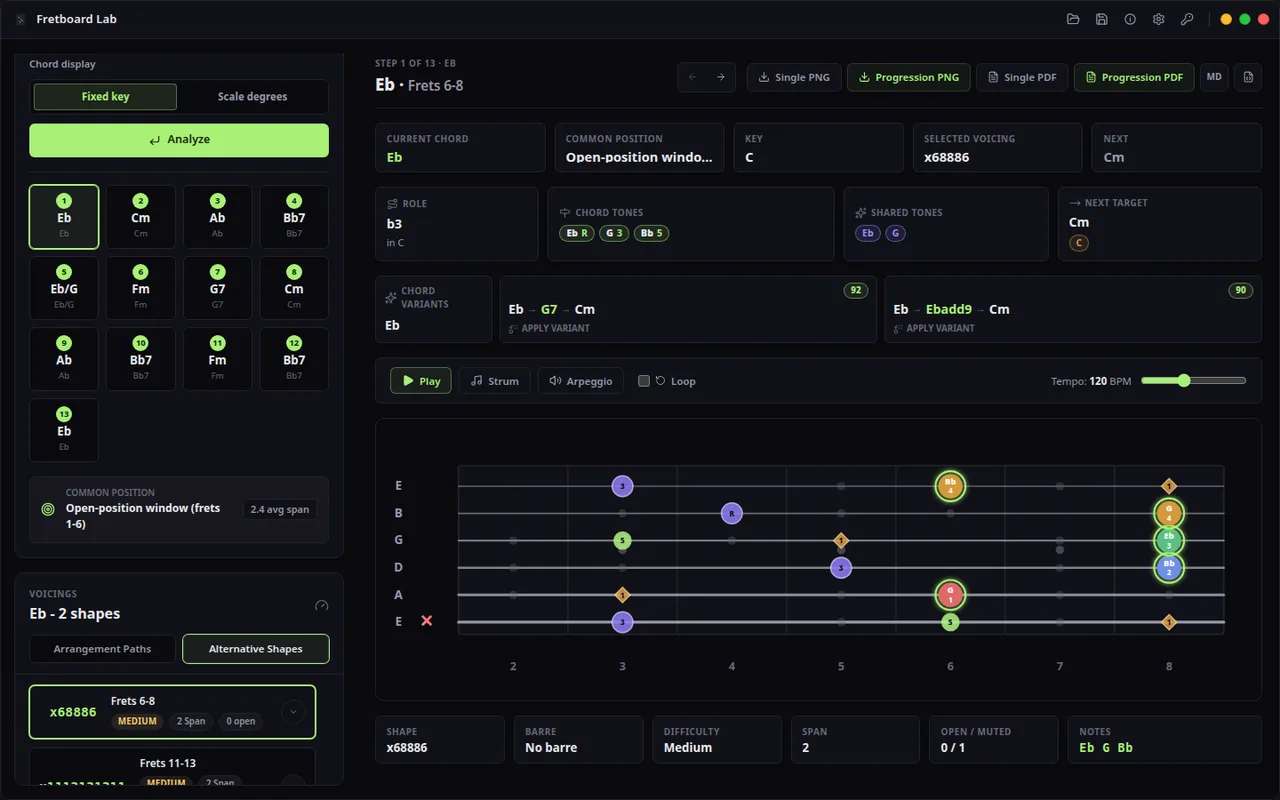
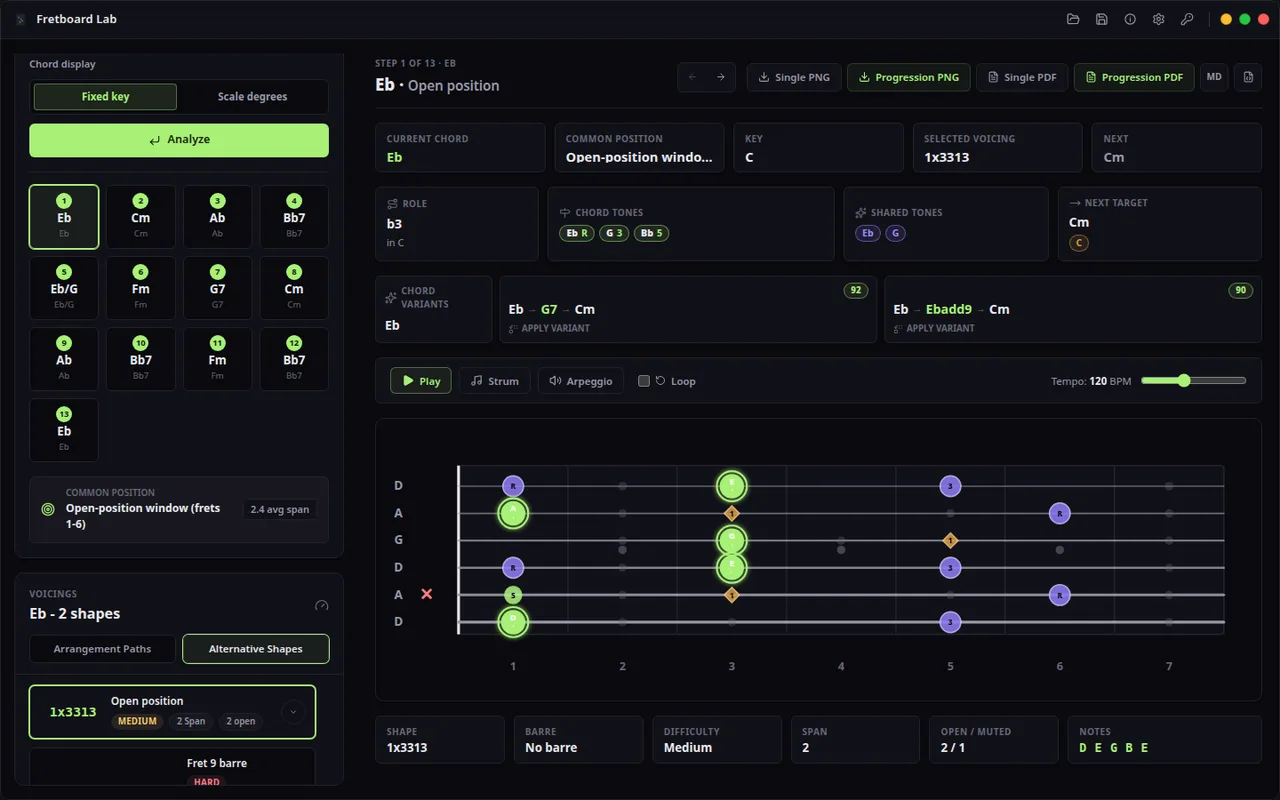
- The app exposes shape, notes, position, muted strings, open strings, span, difficulty, and barre detail so the choice is musical and physical.
- This is built for real arrangement decisions: tighter comping shapes, easier teaching shapes, higher-neck color, and progressions that move smoothly.
The fretboard view does the comparison
- SVG diagrams show finger numbers, open and muted markers, position labels, tuning notes, and barre markers instead of a single static chord box.
- Sort by position, difficulty, span, or open string count to find voicings that fit the player's hand and the next chord.
- Named tunings such as E Standard, Drop D, DADGAD, Open G, Open D, and Half Step Down let the same chord idea be tested across real guitar setups.
Export turns ideas into material
- Export voicing diagrams as PNG, PDF, Markdown, or JSON for practice sheets, lessons, charts, and archive workflows.
- Professional unlocks export, project files, larger bulk export, and progression handouts.
- Local desktop export and project save/open keep lesson material, student notes, and writing ideas in your own file workflow.
Fretboard Lab: free Community edition and optional advanced workflows
- The Community edition is free. Optional paid editions add advanced workflows; see the product page for current access details.
- Purchases and activation stay with the distribution channel you choose: website editions use an emailed license key; a Store build exposes native purchase only when that Store offer is published, and restores entitlements through your Microsoft account.
- Use it when the question is not what the chord is, but which voicing belongs in this bar, tuning, hand position, and song.
Free
Chord look-up, voicing preview, progression analysis, and alternate tuning exploration.
- Chord parsing
- Voicing generation
- Progression analysis
- Standard and alternate tuning support
Professional
One-time professional license for export and project file workflows.
- PNG, PDF, Markdown, and JSON export
- Save and open Fretboard Lab project files
- Bulk export beyond small voicing sets
- Larger progression handouts
- Website checkout activation
Compare
Oolimo Alternative for Guitar Chord Voicings: Fretboard Lab Compared
The blue-marked column is the product on this page. The other names are comparison context for buyers who are deciding between focused desktop workflow, cloud accounts, subscriptions, and broader tools. Read why Hannes wins.
| Starting situation | Missing artifact This product | Strong first workflow |
|---|---|---|
| You see an unfamiliar chord symbol in a chart | A quick note/shape reference | A chord-reference lookup may be enough |
| You cannot recall notes or intervals on the neck | Repeatable recall and drills | A fretboard trainer or structured practice routine |
| You are learning a scale vocabulary | Pattern, interval, and technique practice | A scale-focused learning workflow |
| You know the harmony but current shapes are awkward | A playable voicing in a particular position/tuning | A chord-voicing finder with constraints |
| You teach or arrange for another player | Clear diagrams and a documented choice | A voicing workflow plus export/review |
| You are writing a progression in an alternate tuning | Chords that respect the chosen tuning and musical register | A tuning-aware chord-voicing workflow |
Before using Fretboard Lab
Oolimo is a great web-based chord reference. The Community edition is free. Optional paid editions add advanced workflows; see the product page for current access details. Search chords by playability and stretch, generate progressions, see every voicing across the fretboard, and work in alternate tunings without a browser. See the full comparison on our blog.
Compare
Fretboard Lab
Type Cmaj7, Am7, or I-V-vi-IV and explore playable fingerings sorted by position, span, open strings, and difficulty across standard and alternate tunings.
Use cases and boundaries
When Fretboard Lab is the right tool.
Fingering span, fret position, tuning, and diagram export
Evaluate fingering span, fret position, tuning, and diagram clarity so the result becomes a chord shape a guitarist can actually play.
Workflow
-
When a chord name is not enough
Compare playable voicings, fret positions, open strings, muted strings, stretch, and difficulty before choosing the shape to keep.
Reference: Guitar Chord Finder: How to Choose Playable Voicings -
When a beginner chart must be readable
Turn chord symbols into clear diagrams with string names, fret numbers, fingering context, and shapes that match the player’s tuning.
Reference: Guitar Chord Chart Maker for Playable, Reusable Diagrams -
When alternate tuning changes the answer
Regenerate voicings for the tuning or capo position instead of reusing standard-tuning diagrams that no longer fit the song.
Reference: How a Capo Changes Guitar Chords: Transpose Without Relearning Shapes -
When a progression needs better movement
Review inversions, nearby shapes, chord tones, and position changes so the next chord is playable in context, not only correct on paper.
Reference: How to Generate Guitar Chord Voicings for Progressions: From Roman Numerals to Playable Shapes -
When a lesson or arrangement needs diagrams
Export clean chord diagrams once the voicing, tuning, and position choices are ready to share.
Reference: Export Guitar Chord Diagrams as PNG or PDF: A Clean Lesson-Sheet Workflow -
When theory needs to become a guitar decision
Use scale degrees, chord quality, and roman numerals only as far as they help the player choose a usable fretboard shape.
Reference: Oolimo Alternative for Guitar Chord Voicings: Fretboard Lab Compared