
PCAP Surgery Turn noisy captures into focused, reviewable support artifacts.
Isolate the flow that matters, preview controlled changes, and export a minimal repro or regression fixture without overwriting the source capture.
Views
Product views
Sample reports
See what the handoff looks like.
Public examples show how the product turns failure symptoms, local evidence, and next actions into something a customer, vendor, teammate, or clinic operator can read.
IPv4 header-masking review for a support case
A sample review of IPv4 header masking and subset selection. It explicitly does not claim that application payloads or unknown protocols have been sanitized.
Checksum-safe IP and port rewrite for a lab fixture
A sample report for rewriting endpoints in a PCAP while preserving protocol structure and repairing IPv4, TCP, and UDP checksums.
Large capture trimmed to the failure window
A sample handoff for reducing a large PCAP to the packets that explain the failure while preserving timing and packet context.
Minimal repro, controlled rewrites, evidence handoff
Prepare the capture another engineer actually needs.
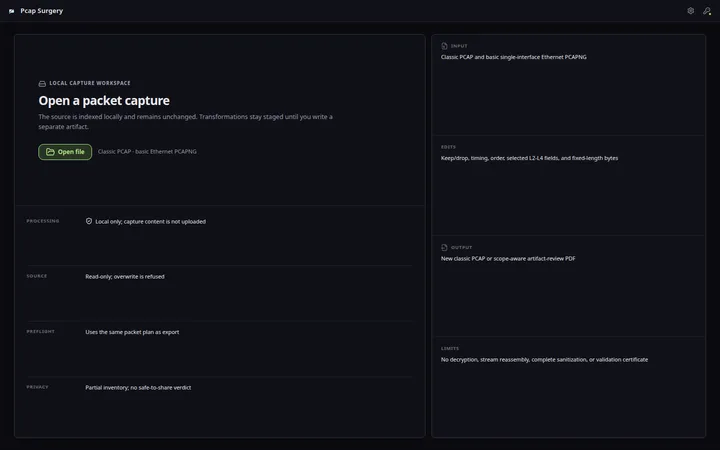
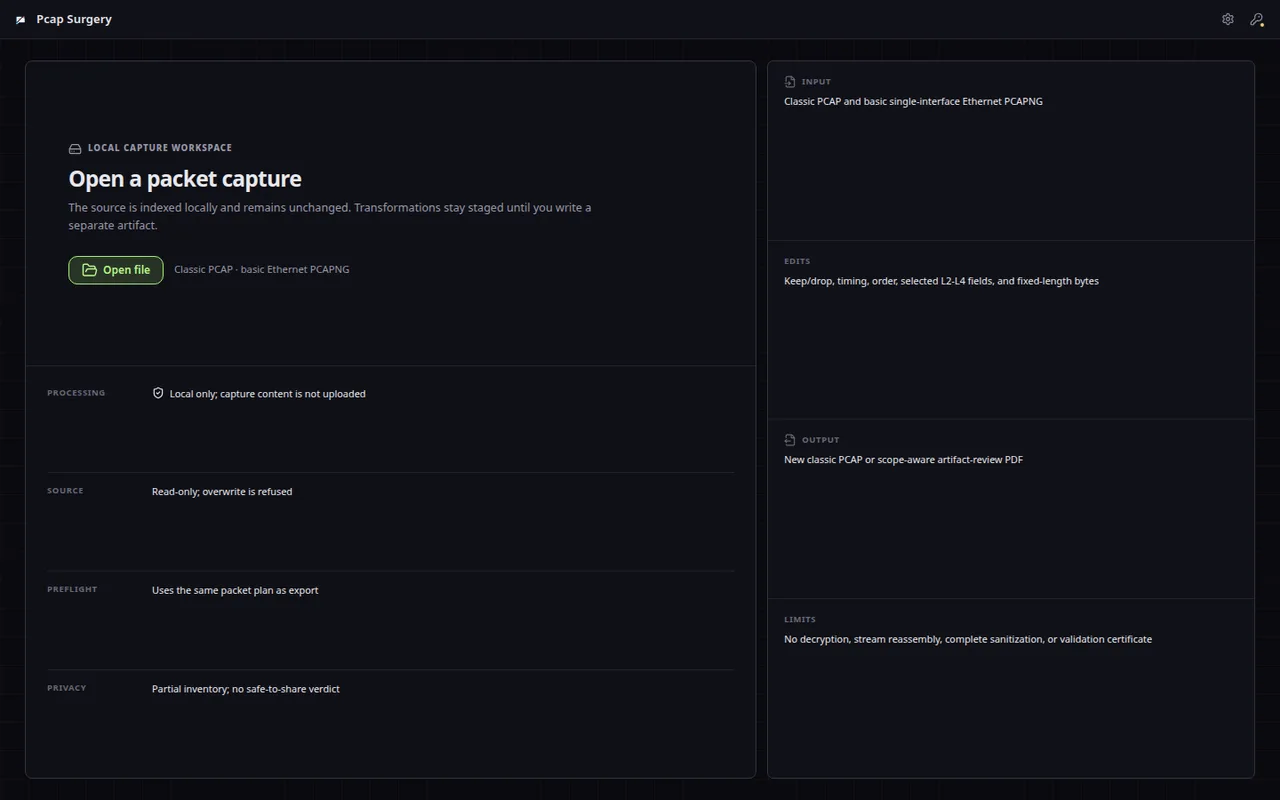
PCAP Surgery is a local desktop workbench for opening classic PCAP and basic single-interface Ethernet PCAPNG, narrowing evidence, previewing supported L2-L4 transformations, and exporting a focused classic PCAP. IPv4 header masking is not full payload redaction.
Inspect before you change anything
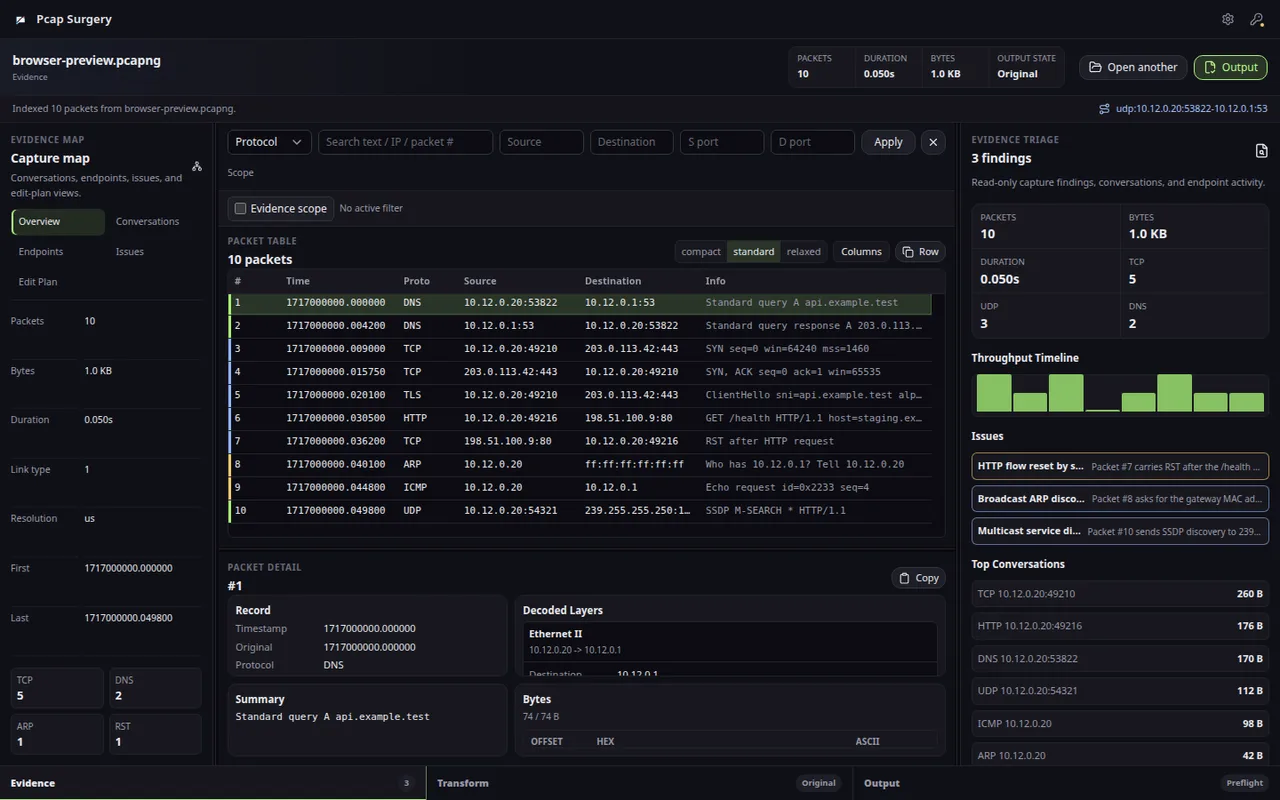
- Classic PCAP and basic Ethernet PCAPNG import feed a dense packet table with protocol, endpoint, direction, packet number, time range, and text filters.
- Ethernet, IP, TCP, UDP, DNS, ICMP, ARP, offsets, and payload bytes stay tied to the selected packet so edits are grounded in visible evidence.
- The workflow is built for packet-capture evidence review, not a generic capture viewer with edit commands bolted on.
Edits are explicit and exportable
- Community can inspect and preview transformations; Professional unlocks writing edited and subset classic PCAP artifacts.
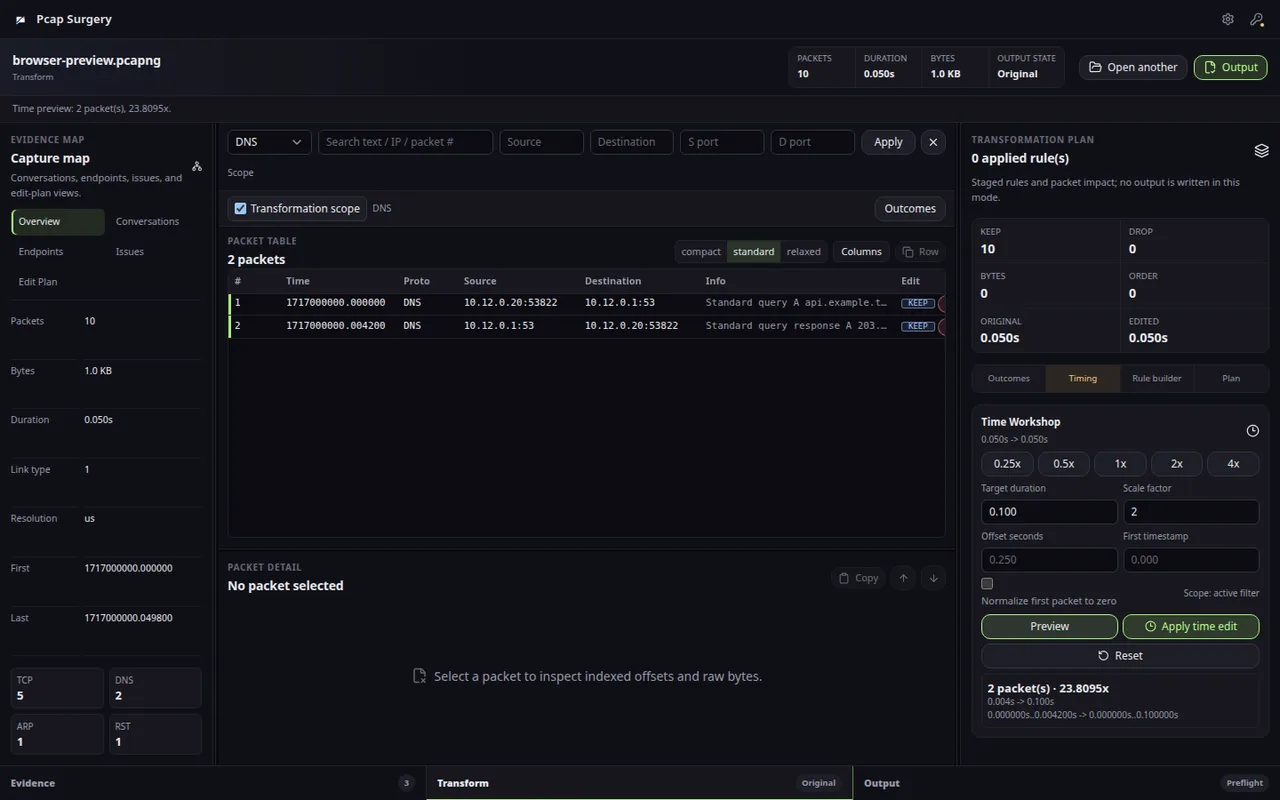
- Supported edit paths cover fixed-length byte changes, trim/keep decisions, timing changes, IPv4 and MAC rewrites, ports, VLAN fields, and selected TCP/IP fields.
- Supported header rewrites report IPv4/TCP/UDP checksum repairs. Raw byte edits do not receive automatic checksum repair.
Repair without losing the story
- Indexed packet windows stay focused through filters, the evidence map, decoded detail, byte evidence, and export scope rather than forcing every task into CLI notes.
- Subset export helps remove unrelated packets while preserving the sequence and timing evidence needed for DNS, TCP, UDP, ICMP, ARP, and application investigations.
- Classic PCAP export is the paid path today, with a focused workflow for trimming, supported header rewrites, timing repair, and minimal reproduction artifacts.
Free planning; pay only to write the artifact
- Use Community for local inspection and transformation previews; use Professional when you need to write edited or subset PCAP artifacts.
- No subscription and no cloud upload are required for customer traces, lab captures, or incident evidence.
- The value is a reviewable path from noisy evidence to a smaller support or regression artifact, without a fragile command-line pipeline.
Free
Local capture inspection and validation workflows for small PCAP surgery tasks.
- Capture metadata review
- Packet evidence inspection
- Filter and detail workflows
- Website direct downloads
Professional
One-time lifetime license for writing edited PCAP, subset PCAP, and scope-aware artifact-review PDF outputs.
- Export edited PCAP files
- Export subset PCAP files
- Write scope-aware artifact-review PDFs
- Write outputs containing previewed rewrites and IPv4 header masking
- Write supported checksum repairs into the output
Compare
PCAP Surgery vs Wireshark, editcap, and TraceWrangler
The blue-marked column is the product on this page. The other names are comparison context for buyers who are deciding between focused desktop workflow, cloud accounts, subscriptions, and broader tools. Read why Hannes wins.
| Capability | PCAP Surgery This product | Wireshark | editcap | TraceWrangler |
|---|---|---|---|---|
| Primary job | Prepare a focused support/QA artifact | Analyze protocols | Script capture operations | Sanitize and transform traces |
| Protocol depth | Basic Ethernet/IP/TCP/UDP evidence | Extensive | Metadata-oriented | Transformation-oriented |
| Visual transformation preview | Yes, for supported rules | Not the main workflow | No | Workflow dependent |
| Exact export preflight | Full/subset artifact counts and warnings | No equivalent handoff stage | Command output | Workflow dependent |
| Complete payload sanitization | No | No | No | Deeper specialized support |
| Output today | Classic PCAP and scope-aware artifact-review PDF | Multiple analysis/export paths | Multiple capture formats | Specialized transformed traces |
Before using PCAP Surgery
PCAP Surgery is a visual capture-transformation workbench, not a replacement for either tool. It connects evidence scoping, per-rule impact preview, supported checksum-aware rewrites, and classic PCAP export without requiring a fragile command pipeline. It does not yet strip arbitrary payloads or provide Wireshark-level protocol analysis.
Compare
PCAP Surgery
Isolate the flow that matters, preview controlled changes, and export a minimal repro or regression fixture without overwriting the source capture.
Use cases and boundaries
When PCAP Surgery is the right tool.
PCAP/PCAPNG scope, selected flow, time range, supported rewrites, checksum impact, and unresolved payload privacy
Open the capture, isolate the packet evidence, preview supported transformations, and export a smaller artifact without claiming full sanitization.
Workflow
-
When the capture is too noisy to share
Open the local PCAP, find the relevant conversation, trim the time range, preview supported rewrites, and export a smaller evidence file.
Reference: PCAP Surgery Workflow: Investigate, Edit, and Export -
When customer data must stay private
Review addresses, payload previews, hostnames, and protocol fields before writing rewrite rules. Current header masking does not certify payload privacy or post-export validity.
Reference: PCAP Surgery vs Wireshark, editcap, and TraceWrangler -
When a support case needs one clean packet trail
Narrow DNS, TLS, TCP reset, malformed payload, retransmit, or timeout evidence into a file that another team can inspect without unrelated traffic.
Reference: PCAP File Analyzer vs Editor: Complete Packet-Evidence Workflow -
When edits break packet validity
Repair IPv4, TCP, and UDP checksums during export so the handoff file remains useful in downstream packet tools.
Reference: PCAP Surgery vs editcap for Packet Artifact Preparation -
When Wireshark is useful but not the last step
Use broad analysis to understand the capture, then use PCAP Surgery to reduce it, apply supported transformations, review limitations, and write the final artifact.
Reference: PCAP Privacy Review: What Header Masking Does Not Remove -
When an untrusted capture arrives
Treat outside PCAP files as sensitive material: inspect locally, avoid exposing unnecessary payload, and export only the minimum packet evidence needed.
Reference: PCAP Surgery Capture Scope, Formats, and Export Limits