
Bus Scope USB diagnostic utility for proving what a device did on the bus.
Inspect live USB traffic, decode device evidence, and retain structured .bscope sessions for firmware and hardware debugging.
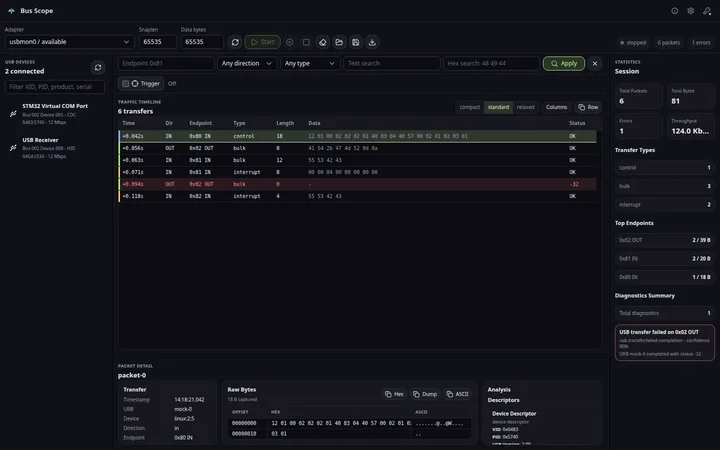
Views
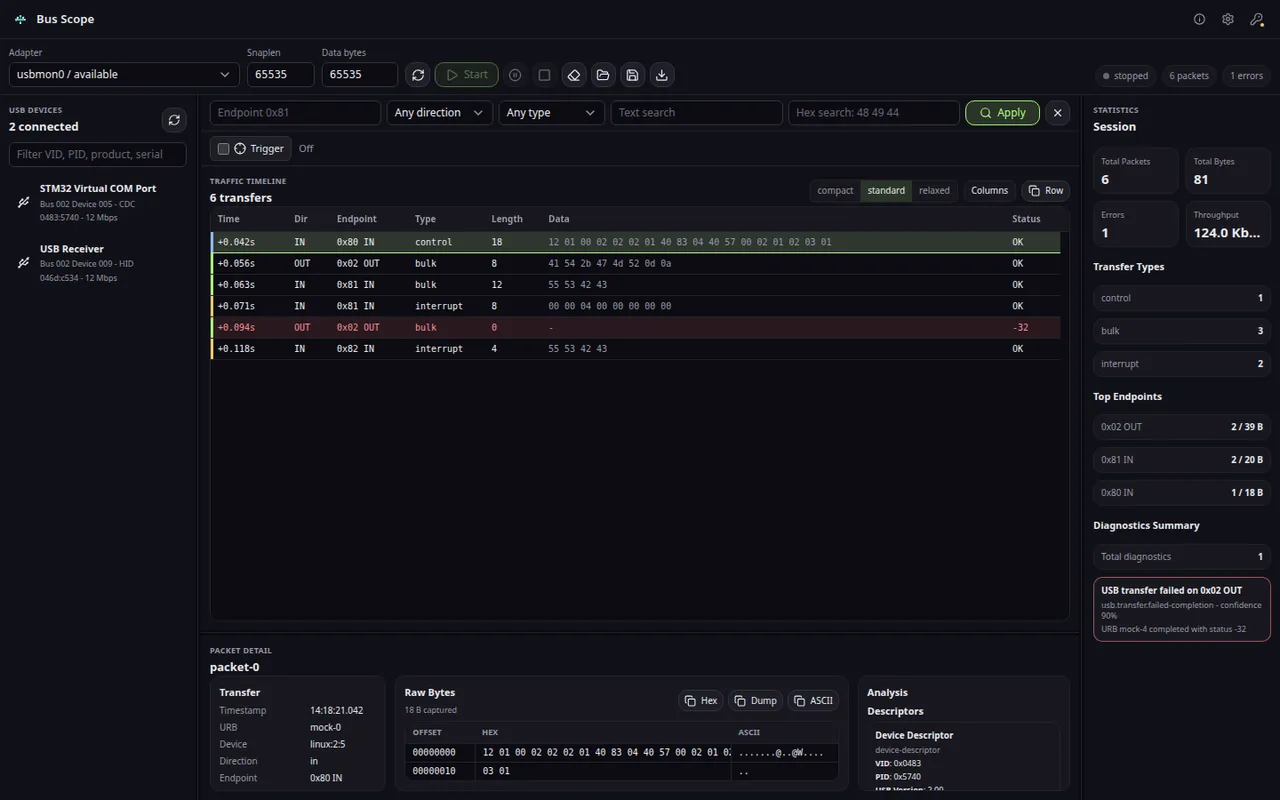
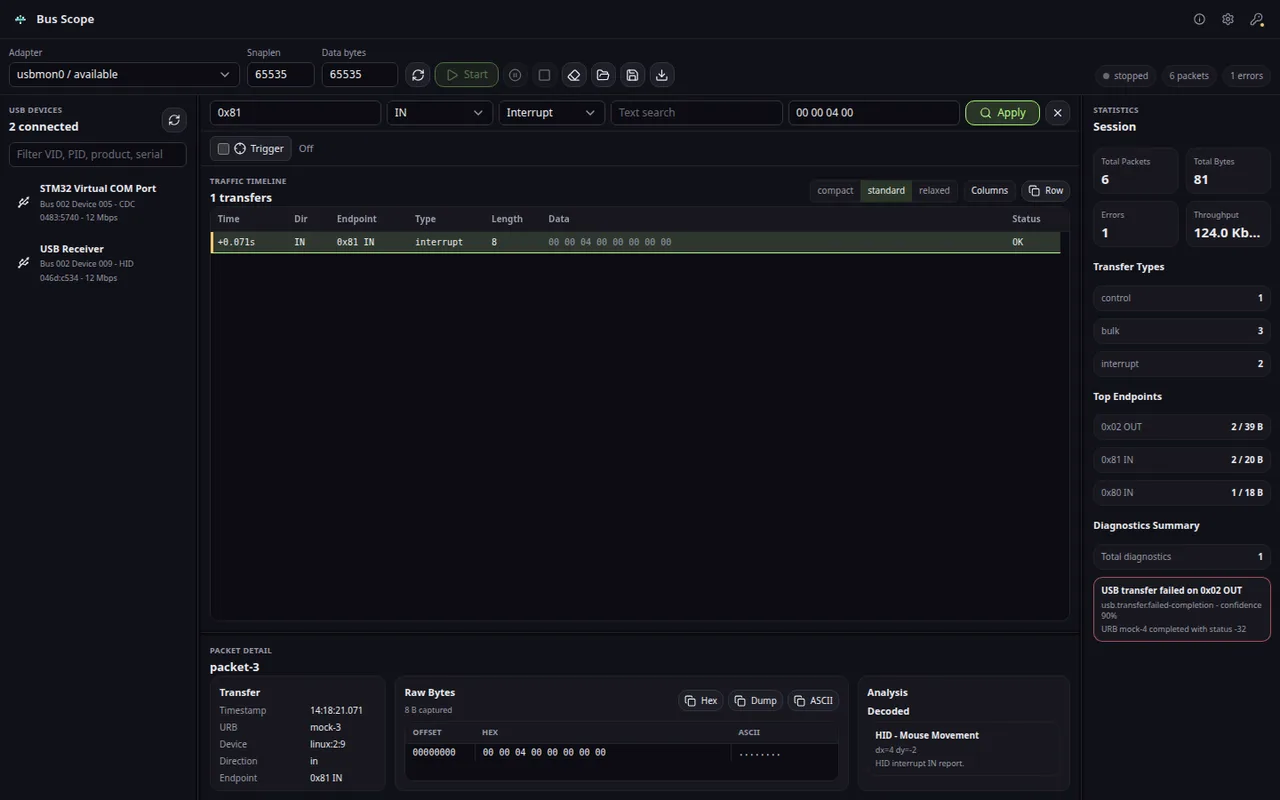
Product views
Sample reports
See what the handoff looks like.
Public examples show how the product turns failure symptoms, local evidence, and next actions into something a customer, vendor, teammate, or clinic operator can read.
USB device enumerates but the descriptor is wrong
A Bus Scope sample report that separates host driver blame from a device descriptor mismatch during enumeration.
USB bulk endpoint stalls during firmware transfer
A sample report for a device that enumerates but stalls or times out during a bulk endpoint transaction.
HID feature report is sent but the device state does not change
A sample report for HID devices where the host sends a feature report but firmware does not apply the expected state change.
USB diagnostics with a case file
Stop treating USB failures like random driver behavior.
Bus Scope is the focused desktop USB diagnostics workbench for engineers who need live capture, control transfers, descriptors, HID, CDC, mass storage evidence, reports, and saved .bscope sessions without leaving the local lab machine.
Capture the bus where the bug happens
- Linux usbmon and Windows USBPcap live capture feed a dense transfer timeline instead of forcing every USB diagnostics task through a generic network analyzer.
- Adapter state, device selection, endpoint direction, transfer type, status, text, and hex filters stay visible while traffic arrives.
- The Windows package can include the USBPcap setup path, and the app verifies capture interfaces before declaring live capture ready.
Control transfers become readable
- Setup packets, raw bytes, descriptor evidence, class decoder output, status values, and diagnostic references are tied to the selected transfer.
- Enumeration, endpoint stalls, vendor requests, HID feature reports, CDC line coding, and mass storage command evidence can be reviewed from one USB-first surface.
- Descriptor, HID, CDC, Mass Storage, and UVC interpretation are included in the free Community edition alongside capture and packet inspection.
Sessions and reports survive handoff
- .bscope save/open keeps packets, payload retention, statistics, diagnostics, descriptor evidence, decoded events, and timeline state together.
- Community can export JSON or text; Professional unlocks HTML and PDF report export for customer cases, lab notes, and support handoffs.
- Trigger stop workflows and larger capture query windows support longer investigations without turning the page into a screenshot archive.
Full diagnostics in the free Community edition
- Bus Scope stays USB-only by design, so the workflow starts at device, endpoint, transfer, and payload evidence instead of broad protocol menus.
- Local desktop capture means sensitive firmware, HID, control transfer, and mass storage traces stay in your lab workflow.
- Professional adds only durable .bscope session save/open and HTML/PDF reports; capture, decoding, triggers, large-query inspection, and JSON/text export stay free.
Free
Complete local USB capture and diagnosis for labs, support desks, and field debugging sessions.
- Native usbmon and USBPcap live capture
- USB device explorer and adapter diagnostics
- Descriptor, HID, CDC, Mass Storage, and UVC interpretation
- Trigger stop workflows
- Large capture queries and packet detail inspection
Professional
Optional license for durable session handoff and polished reports.
- .bscope session save and open
- HTML and PDF report export
Compare
Bus Scope vs HHD USB Monitor: USB Analyzer Guide
The blue-marked column is the product on this page. The other names are comparison context for buyers who are deciding between focused desktop workflow, cloud accounts, subscriptions, and broader tools. Read why Hannes wins.
| If the question is… | Best starting category This product | Why |
|---|---|---|
| “Which descriptor request failed during enumeration?” | Host-visible software capture | The host’s setup requests and responses are the primary evidence |
| “Which interface or endpoint returned a STALL?” | Host-visible software capture | Transfer semantics, interface context, and retries are visible to the host |
| “Can we filter and inspect a complicated Windows device workload?” | Windows monitoring workflow | A Windows-focused monitor may fit an existing Windows diagnostic process |
| “Did traffic reach the device, or is the cable/signal path at fault?” | Inline hardware analyzer | The critical evidence may exist below or outside the host software view |
| “Can we attach an instrument between these ports at this speed?” | Hardware analyzer evaluation | Physical topology, supported bus speed, and triggering requirements decide feasibility |
Before you choose Bus Scope
No. Bus Scope is a software-only USB diagnostics desktop workbench. It captures USB traffic using the built-in Linux usbmon and Windows USBPcap interfaces — no external hardware analyzer required.
Compare
Bus Scope
Inspect live USB traffic, decode device evidence, and retain structured .bscope sessions for firmware and hardware debugging.
Use cases and boundaries
When Bus Scope is the right tool.
Descriptors, endpoint traffic, HID reports, and captured transfers
Capture enumeration, descriptors, endpoint transfers, and HID reports locally so firmware and host teams can inspect the same USB evidence.
Workflow
-
When a USB device is not recognized
Capture the enumeration path, endpoint zero traffic, descriptors, and timing so the team can see whether firmware, driver, cable, or host behavior caused the failure.
Reference: USB Device Enumeration Failure: What Firmware Engineers Should Capture First -
When firmware and host teams disagree
Keep requests, responses, transfer sizes, stalls, and timestamps in one session so both sides discuss the same USB evidence instead of separate logs.
Reference: USB Firmware Debugging Workflow: From Enumeration Failure to Evidence -
When HID reports do not match expectations
Decode raw report bytes against the parsed descriptor and show exactly where the device payload diverges from the host interpretation.
Reference: USB HID Feature Report Debugging: GET_REPORT, SET_REPORT, Vendor Commands, and Missing Device Settings -
When bulk transfers stall or disappear
Follow IN and OUT endpoint behavior, time gaps, retries, and class-level details before blaming the application layer.
Reference: USB Endpoint STALL and Bulk Transfer Timeout -
When a capture must become a handoff
Save a structured .bscope session with packets, decoded fields, notes, and enough context for firmware, driver, or hardware review.
Reference: USB HID Boot Protocol vs Report Protocol Debugging -
When the problem is not a USB protocol problem
Keep the investigation focused on bus evidence and clearly separate it from storage cleanup, malware removal, phone repair, or unrelated device utilities.
Reference: Software USB Analyzer vs Hardware Analyzer: When Firmware Teams Need Each