
Turn PDF Piano and Chamber Scores Into Verified MusicXML and MIDI
A practical desktop guide to converting multi-page PDF piano and chamber music into clean, playback-verified MusicXML and MIDI without cloud uploads.
Every accompanist and chamber musician eventually faces the same deadline crunch: a vocalist needs a three-page piano accompaniment transposed down a whole step before tomorrow's rehearsal, or a producer wants an archival chamber score converted into a clean DAW mockup without re-typing nine hundred notes by hand. Converting a multi-page PDF directly into MusicXML or MIDI saves hours only when the exported file lands cleanly in the receiving software instead of collapsing under shifted beats and orphan ties.
This practical walkthrough shows how to take real piano and chamber PDFs from raw scan to verified .musicxml, .mxl, and .mid deliverables inside Score Craft on Windows or Linux—completely offline, using audible verification at every milestone.
Why piano and chamber PDFs break blind PDF converters
Single-line melodies rarely expose the weak points of automatic PDF-to-MusicXML conversion. Piano grand staves and multi-part chamber scores are much more demanding because two hands or multiple instrumental lines share barlines while carrying independent rhythmic layers.
Three recurring pitfalls ruin blind exports into MuseScore, Dorico, Sibelius, or a DAW:
- Silently unbalanced measures: If bar 14 loses a single sixteenth rest on a faint photocopy, MusicXML importers either force an irregular measure or spill beat one of bar 15 backward, leaving every subsequent bar shifted against your DAW metronome.
- Broken accidentals and octave drift: When a left-hand accompaniment climbs above middle C into a temporary treble clef—or when a dense arpeggio relies on high ledger lines—an undetected clef or ledger error makes the entire passage sound jarringly wrong once transposed for a singer.
- Slurs misread as sustained ties: Expressive Romantic phrasing arcs often cross neighboring noteheads. If a converter mistakes a short slur for a tie, exported MIDI files hold stuck notes across barlines and muddy every chord change.
Catching these three failure modes inside Score Craft before exporting takes a small fraction of the time it takes to untangle them downstream.
Step 1: Load the multi-page PDF and confirm macro form
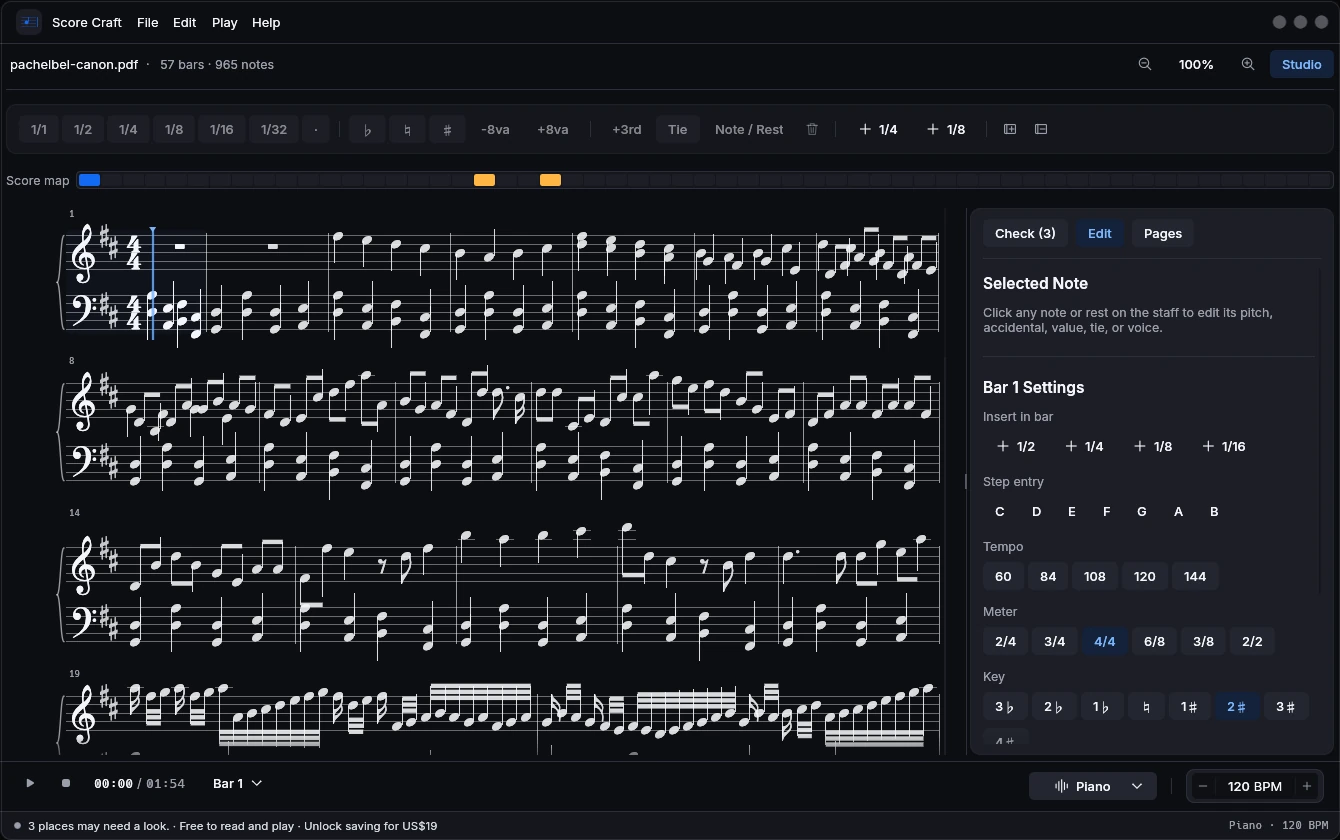
Open your PDF score directly from the File menu in Score Craft. If your rehearsal packet consists of individual PNG or JPG page scans from a binder, open page one and append pages two, three, and four inside the Pages tab of the right-hand Studio dock using Add image or PDF... so the entire movement lives in one uninterrupted grand-staff score.
Before touching individual notes, confirm the opening framework in bar 1 against page 1 in the Reference Pages pane: clef pair, key signature, and meter. Check the total measure count in the top document bar against your printed score, and press Play to hear the opening phrase through the built-in Salamander Grand piano voice. If you are preparing a chamber trio or vocal-piano reduction where overlapping inner lines blur together on one timbre, try switching among the six additional built-in audition voices to separate contrapuntal strands clearly by ear. Full ingestion tips live in our PDF and image scanning guide.
Step 2: Resolve flagged measures with cropped PDF proof
Rather than scrolling anxiously through fifty or eighty clean measures, inspect the Score map strip along the top edge of the engraved staff. Amber markers highlight exactly where recognition flagged uncertainty. Open the Check tab inside the Studio dock to inspect each card in sequence.
Suppose bar 19 raises a Check rhythm flag on Right hand · F#5 because a thin sixteenth-note beam faded on the scan, while bar 31 flags Too many beats with an exact beat delta and bar 42 flags Unclosed tie. On each card:
- Examine the zoomed Source excerpt clipped directly from the original PDF with its blue target box framing the exact symbol.
- Click Locate to center the measure and Audition to hear it immediately at your chosen BPM.
- Apply targeted structural fixes—Auto-balance bar for minor beat totals, Clear dangling tie for phrase-slur artifacts, Shift octave for ledger-line jumps, or Resolve voices when inner piano voices collide—and click Resolve once the measure sounds identical to the printed page.
For deeper techniques across all eight diagnostic tags, follow the pinpoint proofreading diagnostics guide.
Step 3: Polish key changes, accidentals, and missing beats
Once every amber card is resolved, perform a fast musical pass through modulations, repeat signs, and quiet inner voices using the Studio Edit dock. Dial the bottom BPM control down to around seventy or eighty percent speed and listen through section boundaries:
- Click any misread inner voice to nudge pitch by semitone or jump an octave (
-8va/+8va), toggle flat, natural, or sharp accidentals, or stack a missing harmony interval with+3rd. - Adjust written durations across
1/1through1/32plus dots, flip phantom notes back to rests with Note / Rest, or toggle Tie cleanly across barlines. - Rebuild creased or smudged beats using Insert in bar (
+ 1/2,+ 1/4,+ 1/8,+ 1/16) andC D E F G A Bstep entry. - Anchor structural changes in Bar Settings—tempo presets, meters (
2/4,3/4,4/4,6/8,3/8,2/2), key signatures, clefs, and repeat barlines—knowing every step can be reversed through full Undo and Redo.
Read every control detail in the measure and notation editing guide.
Step 4: Deliver clean MusicXML for notation suites and MIDI for DAWs
With zero open proofreading flags and clean playback across all transitions, pick the delivery format that fits your downstream job:
- Export
.musicxmlor.mxlwhen you plan to transpose a vocal accompaniment in MuseScore or Dorico, extract violin and cello parts from a chamber score, or add lyrics and fingerings for publication. Accurate key signatures, clefs, meters, and balanced bars guarantee that automatic transposition spells accidentals cleanly without scrambling later measures. - Export
.midwhen dropping a keyboard or chamber score straight onto a DAW timeline to trigger orchestral sample libraries or build tempo-mapped backing tracks. Because dangling ties and beat deltas were eliminated locally, every downbeat snaps cleanly to the host bar grid. - Export
.wavwhenever singers or ensemble partners need an immediate lossless offline practice track straight from the verified score.
Remember that scanning, grand-staff playback, pinpoint proofreading, and full notation editing are free in Community Edition; exporting edited MusicXML, MIDI, and WAV unlocks with a one-time license (Website Direct options on the Pricing page, or a permanent Microsoft Store in-app unlock on Store builds). Check the full delivery checklist in our MusicXML, MIDI, and WAV export guide.
Where to go next in the Score Craft workflow
To see how this conversion workflow fits alongside scanning best practices and comparison criteria, revisit the complete offline sheet music scanning workflow, compare alternatives in Score Craft vs ScanScore and Score Craft vs Audiveris and PhotoScore, or check common answers in the sheet music scanner software FAQ. Download Community Edition on the Score Craft download page to test your own piano or chamber PDF offline, and browse more tutorials on the Score Craft blog. A Simplified Chinese version of this PDF to MusicXML and MIDI guide is also available.