
Edit Pitches, Rhythms, Accidentals, and Bar Settings
Once optical recognition produces a playable draft and the proofreading queue narrows down problem bars, direct score editing lets you polish every musical detail before leaving the desktop workspace. Score Craft pairs a compact notation strip above the score map with the dedicated Edit tab inside the Studio dock so you can revise single notes, chords, rests, and measure-level properties while keeping the full grand staff and original reference pages close at hand.
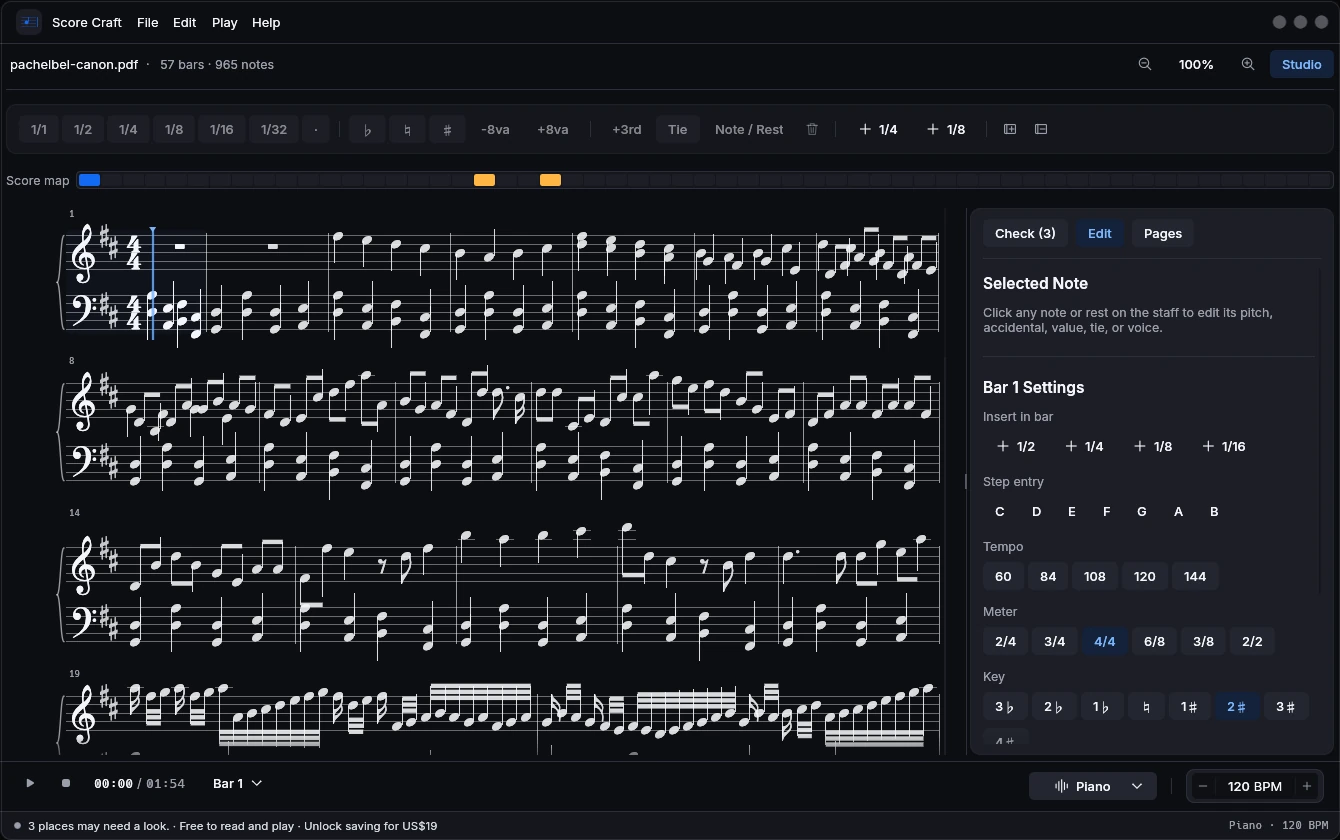
Select any note or rest to adjust pitch, accidentals, and octaves
Click directly on any notehead or rest on the treble or bass staff to activate selection. The Selected Note section at the top of the Edit tab reflects the active symbol, while the horizontal ribbon directly beneath the document header keeps single-click notation actions within reach.
To correct a misread pitch—such as an inner accompaniment voice sitting one scale step too low—transpose by semitone or shift a full octave using the -8va and +8va controls. When a courtesy accidental dropped out during scanning or a sharp was misread as a natural, toggle flat (b), natural, or sharp (#) directly from the ribbon. Every pitch change triggers immediate visual redrawing on the staff and updates playback immediately, making it easy to verify harmonic color against the Salamander Grand piano voice.
If a left-hand accompaniment dyad or right-hand harmony missed its upper or lower partner on a crowded scan, use +3rd to stack a third interval directly onto the selected note, then nudge pitch or accidental if the harmony requires a fourth or fifth instead. Full Undo and Redo cover every pitch, accidental, and interval edit so you can audition an adjustment and revert cleanly in one keystroke.
Change note values, dotted rhythms, ties, and note-to-rest conversion
Rhythmic mismatches usually stem from faint augmentation dots, broken secondary beams, or a tiny rest mistaken for a grace-note smudge. With a note or rest selected, pick its exact written duration from the value buttons spanning whole notes (1/1), half notes (1/2), quarter notes (1/4), eighth notes (1/8), sixteenth notes (1/16), and thirty-second notes (1/32). Click the . dot control to add or clear an augmentation dot on any supported value.
Use Tie to connect sustained notes cleanly across beats or barlines, or clear an accidental tie created by a short phrase slur. When optical scanning turns an eighth rest into an unintended stray pitch—or turns a light notehead into a rest—click Note / Rest to convert the symbol in place without upsetting the rest of the bar's rhythmic spacing. To drop an extra phantom event entirely, click the delete icon on the ribbon and confirm that the measure's beat total lines up with the active time signature.
Insert missing notes by rhythm or step letter name
Sometimes a heavily creased page or low-contrast photocopy omits an entire beat or half-measure phrase. Rather than re-scanning the entire sheet, select the affected bar and scroll to Bar Settings inside the Studio Edit dock.
Under Insert in bar, click + 1/2, + 1/4, + 1/8, or + 1/16 (or use the quick + 1/4 and + 1/8 triggers on the top ribbon) to insert a fresh rhythmic slot at the active bar position. When entering a specific melodic line, use the Step entry row (C, D, E, F, G, A, B) right below it to place exact diatonic pitches swiftly, then adjust octaves, accidentals, or durations as needed. Because Score Craft preserves full Undo/Redo across insertion batches, you can reconstruct a missing two-bar transition, play it at reduced BPM, and compare it side by side with the original PDF page in the Pages tab.
Configure tempo, meter, key signature, clef, and repeat barlines per bar
Not every scanning issue lives inside a single notehead. A classical sonata movement might modulate from D major to A major mid-piece, switch from 4/4 to 3/4 for a dance variation, or introduce a bass-to-treble clef change in the left hand for a high cantabile melody.
Inside the Edit dock's per-bar settings panel, adjust structural metadata starting at the active measure:
- Tempo: Pick quick studio tempo presets (
60,84,108,120,144BPM) directly in the bar panel to anchor tempo changes inside the score, while still using the bottom transport BPM control for continuous practice speed scaling. - Meter: Switch bar time signatures among
2/4,3/4,4/4,6/8,3/8, and2/2whenever an optical pass misses a meter change or misreads cut time. - Key: Set flat, natural, or sharp key signatures directly from the visual selector (
3b,2b,1b, natural,1#,2#,3#,4#, and beyond) so pitch spelling and MusicXML key declarations stay accurate downstream. - Clef and repeat barlines: Update staff clefs where a hand crosses register, and place or correct repeat barlines so exported scores reflect the intended musical form.
Combine editing with proofreading and export
For the fastest turnaround on multi-page scores, finish structural bar settings (clef, key, and meter) first, clear high-confidence alerts using the Studio Proofreading Dock guide, and then perform fine melodic and rhythmic edits here. If you need to pull in missing scan pages while rebuilding a passage, revisit the PDF and image scanning guide.
Once your edited measures play back cleanly across every transition, follow the MusicXML, MIDI, and WAV export guide to deliver clean files to MuseScore, Dorico, Finale, Sibelius, or your DAW. You can also explore the end-to-end offline sheet music scanning workflow and check common licensing and editing questions in the sheet music scanner software FAQ. Download Community Edition from the Score Craft download page to try full notation editing free, browse every guide in the help center, or read more walkthroughs on the Score Craft blog. This guide is also available in Simplified Chinese.