
Proofread Scanned Scores With Pinpoint Source Diagnostics
Even clean printed PDFs contain printing quirks that challenge optical music recognition: faint sixteenth-note beams, tight ledger-line chords, ties colliding with barlines, or polyphonic keyboard passages where two voices share one stem direction. Instead of leaving you to hunt through dozens of measures by eye, Score Craft surfaces uncertain spots inside the Studio Proofreading Dock and links every alert directly to visual proof from the original source page.
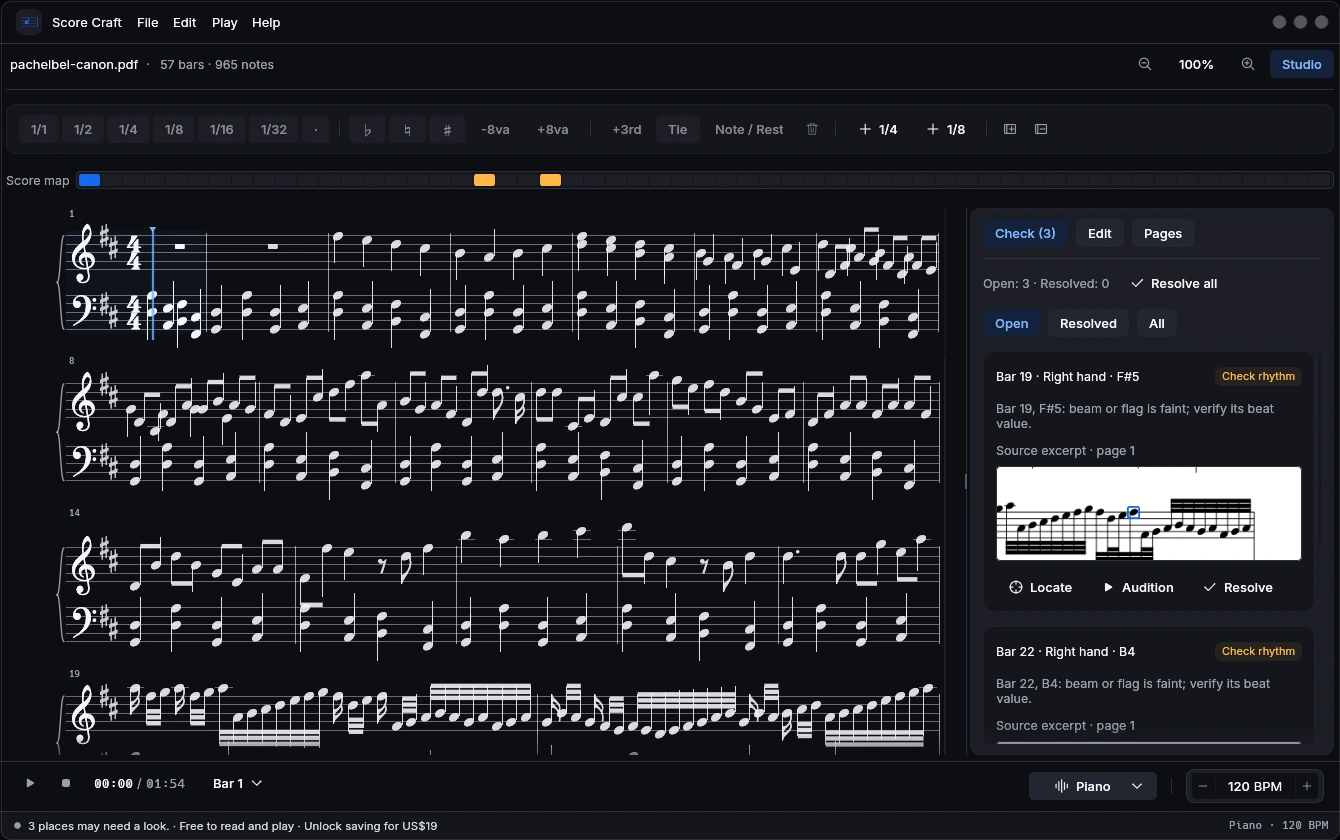
Read the Score map and diagnostic queue first
Open the Studio dock from the top right toolbar and select the Check tab. At the same time, glance at the Score map bar running horizontally above the engraved grand staff. Each tile on the map corresponds to one measure in the piece. Clean bars remain neutral, the active playback bar glows blue, and bars carrying open proofreading flags appear in amber.
On a fifty-seven-bar piano piece where only bars 19 and 22 contain faint sixteenth-note beams, the score map lets you skip fifty-five clean measures and spend your attention strictly where recognition confidence dropped. Inside the Check tab, summary counters report Open and Resolved totals, and filter pills let you switch cleanly between Open, Resolved, and All entries while you work through the list.
Understand all eight diagnostic categories
Every card in the Check queue identifies the exact bar number, hand or staff (Right hand or Left hand), target pitch, and one of eight specific diagnostic categories:
- Check pitch: A notehead sits ambiguously on a ledger line, collides with an adjacent second interval, or sits near a smudge where the staff position needs visual verification against the original print.
- Check rhythm: A beam, flag, or augmentation dot looks faint or clipped—for instance,
Bar 19 · Right hand · F#5where a thin sixteenth-note beam could resemble an eighth note if ink dropped out during scanning. - Check rest: A small eighth or sixteenth rest sits in a crowded space and may actually be a dust speck, staccato mark, or alternate rest value.
- Too many beats: The recognized durations in a bar add up to more than the active meter allows, accompanied by the exact beat delta so you know immediately whether an extra eighth or quarter beat slipped in.
- Too few beats: A dropped note, missed dot, or skipped rest leaves the measure short of the time signature, again showing the exact missing beat delta.
- Voice conflict: Two simultaneous rhythmic strands on the same staff overlap awkwardly or disagree on total duration within the bar.
- Unclosed tie: A curved tie starts on a note without finding a matching sustained pitch on the next beat or across the barline, often caused by a short slur misread as a tie.
- Octave jump: An abrupt melodic leap suggests a missed clef change, misplaced ledger line, or misread octave displacement in a running passage.
Inspect the blue-boxed source crop and audition the bar
Never guess from memory when checking a diagnostic card. Each card displays a zoomed Source excerpt cropped straight from the original PDF or scan page, complete with the page number and a blue target box framing the exact note or symbol in question.
Follow a fast three-step verification loop on every card:
- Click Locate to center the engraved grand staff directly on the flagged bar and highlight the exact symbol on screen.
- Click Audition to hear the measure immediately through the Salamander Grand piano voice at your chosen BPM. Hearing a faint sixteenth run or an unexpected octave jump confirms within two seconds whether the audible rhythm matches the blue-boxed print.
- Compare the cropped source image against the engraved measure. If the engraving is already right despite faint ink, click Resolve to move the item into the Resolved list. If the scan misread a beam, beat count, tie, or octave, fix it right away before marking it resolved.
Apply one-click structural fixes safely
Several structural errors do not require rebuilding an entire measure note by note. When a diagnostic identifies a repairable structural issue, the card offers targeted one-click actions backed by full Undo and Redo:
- Auto-balance bar reconciles small
Too many beatsorToo few beatstotals so the measure matches its time signature cleanly without breaking neighboring bars. - Clear dangling tie strips an orphan
Unclosed tieleft behind by a short articulation slur so playback no longer holds the note artificially into silence or across an unintended pitch. - Shift octave corrects an
Octave jumpflag by moving the affected note up or down twelve semitones in a single step while preserving its rhythmic position and accidental. - Resolve voices untangles colliding stems and rhythmic layers on
Voice conflictmeasures so upper and lower strands sum cleanly inside the grand staff.
After applying any automatic repair, press Audition again to verify the musical outcome by ear. If a complex polyphonic measure needs custom note values, extra accidentals, or manual voice entry instead of an automatic structural adjustment, keep the bar selected and switch directly to the Edit tab using our notation and measure editing guide.
Close the loop before exporting
Work through the Open filter until the open counter reaches zero, or use Resolve all only after you have audited every remaining amber marker on the score map and played across barlines around the edited regions. Listening across the bar before and after each fix catches stray ties and accidental carryover that isolated single-bar playback can miss.
If you need to re-check source preparation or append missing pages, return to the PDF and image scanning guide. Once every flagged bar is verified and resolved, move straight to the MusicXML, MIDI, and WAV export guide to deliver clean files. To see how pinpoint proofreading saves hours compared to blind OMR conversion, read the complete offline sheet music scanning workflow and our Score Craft vs ScanScore comparison. You can download Community Edition to test proofreading on your own scans on the Score Craft download page, check all walkthroughs in the help index, or explore deeper articles on the Score Craft blog. A Simplified Chinese edition of this proofreading guide is also available.