
Turn Sung Hooks and Electric Bass Takes Into MIDI With Pitch Bends
Practical studio workflow for converting hummed vocal hooks and fingered electric bass takes into expressive, bend-preserving DAW MIDI using Melody Craft.
Two of the most useful solo recordings to turn into MIDI are also two of the hardest to transcribe cleanly without flattening their musical soul: a hummed or sung vocal hook captured at a desk microphone, and a fingered electric bass groove tracked direct into an audio interface. Both instruments live on subtle pitch trajectories — vocal scoops into a chorus downbeat, relaxed vibrato on a held top note, half-step bass slides up to an octave anchor, and uneven pluck velocities that create pocket.
Strip those bends and dynamics away, and the resulting MIDI sounds like a stiff step-sequencer pattern. Leave uncleaned glitches behind, and your DAW synth warbles unpredictably whenever two notes overlap. Here is how to run both vocal and electric bass recordings through Melody Craft so the exported MIDI keeps real human phrasing intact.
Capture habits that pay off immediately
Whether you are singing a melody into a condenser microphone or plugging a four-string P-bass into a DI box, five seconds of prep prevents minutes of manual piano-roll cleanup:
- For sung or hummed hooks: Sing on an open neutral syllable like "da", "la", or a relaxed hum rather than breathy whispered lyrics full of sharp "s" and "t" consonants. Keep a pop filter in front of the capsule so plosives do not spike the velocity lane. Monitor any backing track through closed headphones so drums and chords do not bleed into the vocal take.
- For electric bass takes: Record the dry DI output before amp distortion or heavy chorus pedals. Overdrive boosts upper harmonics until the second harmonic rivals the fundamental, which is the primary cause of octave-up tracking errors on low
E1andA1notes. Mute unused open strings lightly with your fretting hand so sympathetic ring does not create false overlapping bars.
Bounce or save the section as a mono WAV or FLAC file (though clean MP3 or M4A phone memos also open directly) and drag it straight into Melody Craft.
Calibrating recognition differently for vocals versus bass
Voice and electric bass behave almost oppositely in amplitude envelope and pitch stability, so they benefit from slightly different settings under Settings ▸ Preferences…:
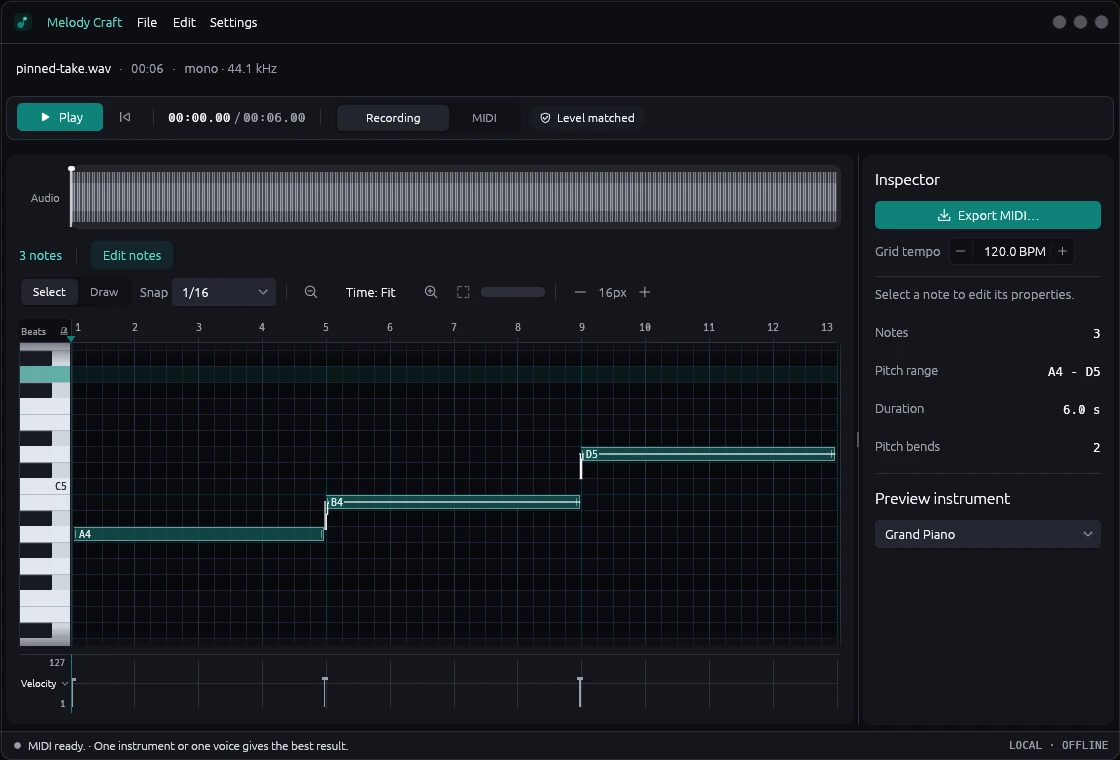
- Sung vocal takes: Human voice ramps smoothly into sustained vowels and often carries wide vibrato. Start with Auto cleaning and Keep slides and vibrato enabled. If wide vibrato on a long note (
A4throughD5, for instance) breaks one sustained syllable into two or three short fragments, raise Onset threshold slightly and run File ▸ Re-convert. If quiet breathy phrase endings cut off early, lower Sustain threshold a touch so tapering notes hold cleanly to the release. - Fingered electric bass takes: Electric bass combines strong initial string plucks with deep low-frequency sustain (
E1–D2and above) plus occasional fret buzz or finger-slide squeaks. Start with Auto; if string handling noises appear as tiny stray ticks between groove hits, switch Recognition style to Cleaner (55 ms minimum unbent duration). Remember that real short articulated slides carrying pitch bends stay protected even in Cleaner mode. Conversely, if rapid muted sixteenth-note ghost plucks disappear, drop down to Detailed (25 ms) or lower Onset threshold slightly so repeated same-pitch notes register separately.
See the complete breakdown of these preferences in cleaning modes, thresholds, and export workflow.
Auditioning with the right preview voice and A/B flip
Once Melody Craft finishes local conversion, glance at the Take Summary in the right-hand Inspector. On a six-second fingered bass clip (Finger.wav), seeing Notes: 11, Pitch range: E1 - D2, Duration: 5.7 s, and Pitch bends: 11 immediately tells you the fundamental register stayed anchored in the true bass octave rather than jumping up to E2–D3, and that every expressive inflection survived extraction.
Now switch to ear verification with Level matched active:
- For bass grooves, select Electric Bass in the Preview instrument dropdown first, play the phrase, and flip between Recording and MIDI over any low-register slide or muted pocket note. Then briefly flip the preview voice to Grand Piano — its crisp percussive attack exposes any slightly late onset or accidentally fused double-pluck in a single pass.
- For vocal hooks, audit attacks first on Grand Piano so rhythmic placement is unmistakable, then switch to a sustaining Synth, Strings, or Wind preview voice. Because a sustained voice holds full energy through the whole bar, you immediately hear whether the stepped pitch-bend curve captures the exact upward scoop and vibrato depth of your singing.
Clicking anywhere along the top Audio waveform strip snaps the playhead straight to a troublesome syllable or bass slide so you can loop-check that two-second transition repeatedly. Full listening procedures are detailed in level-matched Recording versus MIDI A/B comparison.
Tightening bends, velocities, and overlaps in the piano roll
Turn on Edit notes, set Grid tempo (BPM) to match your song project, and run a tight cleanup pass:
- Fix merged repeated plucks without losing bends: On bass lines, two consecutive eighth notes on
A1occasionally glue into one sustained bar. Match the spike in the top Audio waveform, right-click the bar at that transient, and choose Split note here. Melody Craft splits the note cleanly while interpolating the pitch-bend contour across the boundary. - Keep legato slides overlap-safe: Click a bent note and inspect the Pitch bend readout in cents. If the Inspector shows Centered while notes overlap, it means the tail of the previous note is bleeding past the attack of the next note. Melody Craft automatically zeros the single-channel pitch wheel across that overlap window so your DAW synth does not detune the newly struck note. If you want an uninterrupted solo bass slide or vocal glissando to ring all the way into the next beat, trim the trailing edge of the earlier bar by a few milliseconds so the two notes butt cleanly end-to-end without overlapping.
- Preserve pocket in the Velocity lane: Avoid flattening all stems to one constant value. Drag down an overly harsh vocal plosive stem or nudge up a quiet ghosted bass stroke in the bottom Velocity (
1–127) lane, or marquee-select an entire verse and use Velocity offset to raise overall weight while keeping the performer's natural accent ratio intact.
Deep-dive piano-roll shortcuts and batch actions are covered in editing MIDI notes, velocity stems, and pitch bends.
Matching pitch-bend range cleanly inside your DAW
Save your finished work as a .mcraft project so you can revisit the original audio later, then click Export MIDI… (unlocked via one-time license; full conversion, A/B preview, editing, and .mcraft saving stay free in Community Edition).
When you drag the exported Format 0 .mid file onto a synth lead, sampler bass, or brass patch in your DAW, double-check one crucial setting on your receiving virtual instrument: match the synth's pitch-bend range to the file's bend sensitivity (Melody Craft embeds standard RPN pitch-bend range metadata, though some lightweight plugins ignore RPN messages and default to ±2 semitones). Once your receiving instrument's pitch-bend range matches, every vocal scoop, vibrato shimmer, and fingered bass slide replays with startling fidelity — and because Melody Craft centers the bend wheel at every release, adjacent straight notes stay rock-solid in tune.
For the complete five-stage studio map connecting preparation, verification, editing, and licensing, visit the offline audio-to-MIDI transcription workflow. You can also browse more technical walkthroughs on the Melody Craft blog or download Community Edition from the Melody Craft download page to test your own vocal hooks and bass recordings locally.