
Tune Cleaning Presets, Thresholds, and Export MIDI or WAV
Manual piano-roll editing shines when you need to fix a handful of notes. When an entire vocal take feels splintered into tiny fragments, or when quiet pick clicks keep turning into ghost notes across thirty bars, calibrating Melody Craft's recognition settings and running a fresh pass saves far more time than clicking notes one by one. Once the transcription matches your ears, a clean export handoff ensures your DAW receives exact tempo, dynamics, and pitch-bend data.
Open Preferences and choose a Recognition style
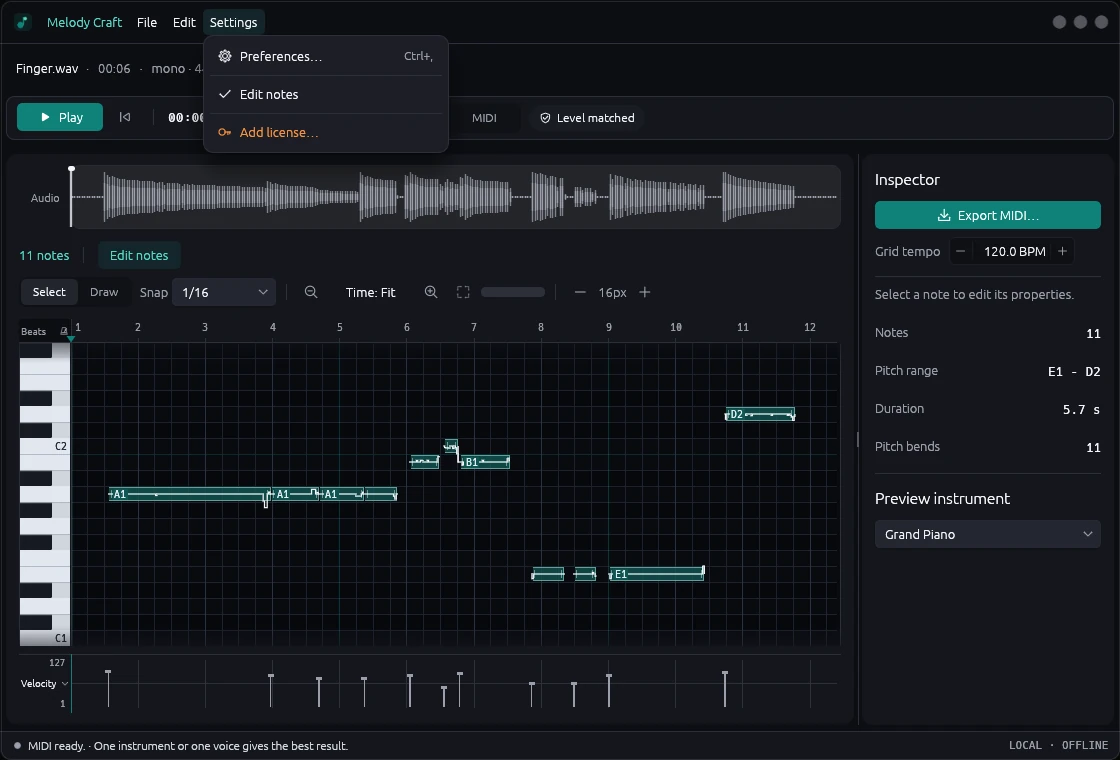
Open Settings ▸ Preferences… (or press Ctrl+,) to adjust how Melody Craft turns raw pitched frames into discrete MIDI events. At the top sits Recognition style, offering three deterministic cleaning presets that control how aggressively brief noise-like fragments are filtered out:
- Auto (default): Balances detail and tidiness by pruning unbent fragments shorter than 40 milliseconds. Start here on almost every solo vocal, electric bass, guitar, or wind recording.
- Cleaner: Raises the minimum unbent duration filter to 55 milliseconds. Choose Cleaner for noisy bedroom vocal captures, acoustic guitars with loud fret squeaks, or breathy wind takes where short transient artifacts appear between real notes.
- Detailed (Detail): Lowers the minimum unbent duration filter to 25 milliseconds so rapid grace notes, quick hammer-ons, fast staccato runs, and ornamental trills survive the cleanup pass intact.
Crucially, Melody Craft's cleaning pass treats genuine pitch-bend motion as musical evidence: even a very short articulated slide carrying a real bend curve is preserved rather than blindly discarded as noise. Because the thresholds are deterministic per preset, running the same recording twice with the same settings always yields identical results.
Calibrate Onset threshold, Sustain threshold, and Keep bends
Beneath the cleaning style selector, three fine controls address the most common phrasing discrepancies between different instruments:
- Onset threshold: Controls how strong a new pitch or energy attack must be to start a separate note. Raise the Onset threshold if sustained vocal vowels, cello bows, or vibrato-heavy sax notes are splitting into multiple repeated fragments. Lower it slightly when fast repeated same-pitch plucks on electric bass or acoustic guitar merge into a single long bar.
- Sustain threshold: Controls how quietly a holding note can fade before Melody Craft ends it. Lower the Sustain threshold to keep tapering vocal tails, nylon-string guitar rings, or fading synth releases connected smoothly through quieter frames. Raise it slightly if room ambience or amplifier hum keeps stretching note endings across natural rests.
- Keep slides and vibrato (Keep bends): Enabled by default so slides, scoops, and vibrato play back in preview voices and write into your exported MIDI file. Turn this toggle off when transcribing strictly quantized keyboard ideas, plucked arpeggios, or bass lines headed for a step-sequenced synth patch where you want dead-center semitone pitches with zero pitch-wheel automation.
Whenever you adjust Preferences on an already-transcribed take, Melody Craft displays a reminder that the current piano roll reflects your previous settings. Choose File ▸ Re-convert to run a fresh pass with the new parameters. Remember that re-converting replaces unsaved manual edits in the current piano roll — so save a .mcraft snapshot first whenever you want to compare two settings side by side.
Save reusable .mcraft projects with non-destructive safety
Before exporting final deliverables, save your work via File ▸ Save project or Save project…. A .mcraft file preserves your complete edited note list, per-note bend curves, velocities, Grid tempo, and link back to the original audio take.
Melody Craft enforces a strict non-destructive save policy across every output type:
- Your original recording is never opened for writing and can never be accidentally overwritten by a MIDI or audio export path.
- Auto-named exports write alongside your open document using predictable names (
<stem>_melody.midfor MIDI and numbered alternatives if that filename already exists), never silently clobbering an earlier draft unless you explicitly confirm replacement in the save dialog. - All file writes stage through a temporary sibling file and commit atomically so a full disk or cancelled dialog never leaves behind a half-written corrupted file.
Export Standard MIDI (.mid) and rendered audio (.wav)
When your level-matched A/B check confirms the take is ready for production, click Export MIDI… in the Inspector (or use File ▸ Save MIDI / Export MIDI as…). Melody Craft encodes a clean, universal Standard MIDI Format 0 file engineered for immediate DAW compatibility:
- Single track, MIDI channel 1 (channel 0 zero-indexed): Drops straight onto any virtual instrument track in Ableton Live, Logic Pro, Reaper, Cubase, FL Studio, Bitwig, or Ardour without splitting notes across stray MPE channels.
- 960 PPQ high-resolution timing: Keeps fast ornaments and sub-10 ms pitch-bend gestures accurate at any musical tempo, synced to the Grid tempo (
BPM) set in the Inspector, with a short quarter-second release tail appended after the final note so DAWs never clip the closing release. - RPN pitch-bend range and release centering: Writes pitch-bend sensitivity metadata and automatically centers the pitch wheel back to
0at the end of each bent note (and during polyphonic overlaps), preventing stuck bends downstream.
If you want a quick audio bounce of your edited MIDI played through your chosen built-in Preview instrument — for instance, sending a clean Grand Piano or Electric Bass demo clip to a bandmate — choose File ▸ Save audio to render a standard .wav file locally.
Understand the Community Edition and one-time license boundary
Downloading and running Melody Craft requires no account and no subscription. In Community Edition, you can transcribe recordings locally, run level-matched A/B comparisons across all built-in preview instruments, edit notes, velocities, and bends in the piano roll, tune recognition preferences, and save .mcraft projects indefinitely.
Exporting Standard MIDI (.mid) and rendered preview audio (.wav) unlocks with a one-time license:
- Website Direct builds (Windows and Linux): Purchase a one-time 1-seat Professional or 3-seat Team license (current details are maintained on the pricing page and license overview), then activate locally offline via Settings ▸ Add license….
- Microsoft Store builds (Windows): Unlock export permanently through the Microsoft Store in-app purchase tied to your Store account, with current pricing displayed directly inside the Store.
After your first successful export, revisit the complete offline audio-to-midi workflow or test a fresh vocal or bass phrase with our solo recording transcription guide to build a repeatable studio routine.