
Dialing Studio Lead Vocals: De-Esser, Opto Comp, Tube Pre, Air Exciter, and Shimmer Reverb
A practical five-step vocal mixing recipe using Vocal Forge's De-Esser, Opto Comp, Tube 610 Preamp, 5-Band Vocal EQ, Air Exciter, and Auto-Ducking Shimmer Reverb.
A great lead vocal sits front-and-center in a dense arrangement without sounding harsh, muddy, or drowned in wet tails. Instead of throwing random presets at a track, following a disciplined five-step vocal recipe lets you take any dry condenser vocal recording from raw booth take to finished record in under three minutes inside Vocal Forge.
Before you start: clean input gain and Breath Gate prep
Every vocal chain responds best when it receives consistent headroom. Check Vocal Forge's right-hand IN meter while singing or auditioning the built-in Soul Lead and Pop Hook phrases, aiming for typical peaks around -12 dBFS to -6 dBFS. If your recording carries computer fan rumble or heavy headphone bleed between lines, engage Breath Gate at the very front of the chain in Smooth or Breath mode. Set Threshold just above the quiet room noise floor (often around -42 dB to -34 dB) and keep Floor attenuation modest at 6 to 10 dB rather than fully muting pauses—that way natural inhalations stay musical instead of cutting to dead silence between words.
Step 1: Control sibilance and glare before dynamics (De-Esser + De-Harsh)
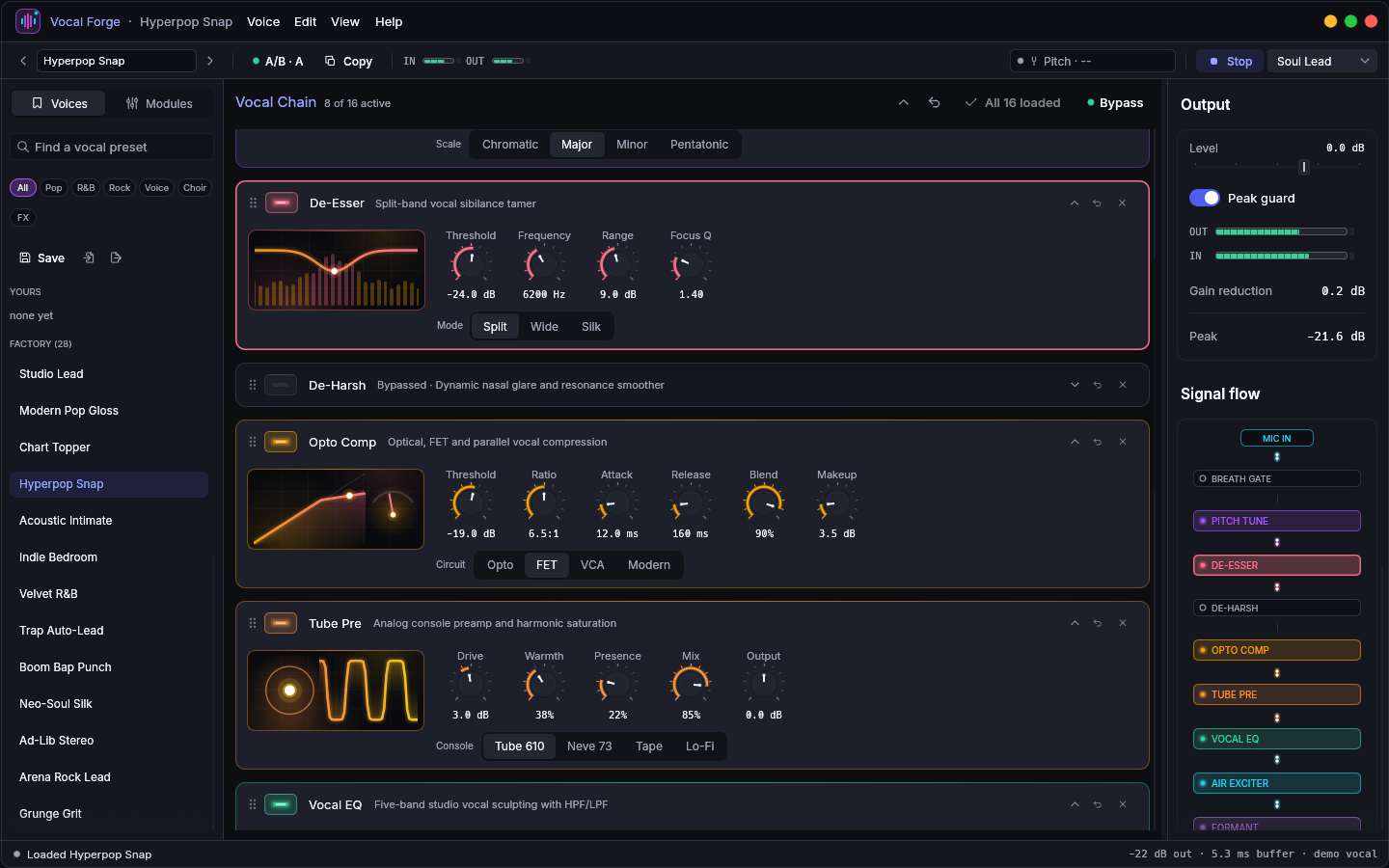
Start from Studio Lead (or click Reset on the rack). Keep De-Esser in Split mode around 6200 Hz with 9 dB Range and adjust Threshold until sharp S and Sh consonants dip cleanly on the coral spectral notch OLED while vowels stay completely bright. Because every voice and microphone capsule emphasizes sibilance slightly differently, sweep Frequency between 5200 Hz and 6000 Hz for deeper baritone and tenor leads, or up toward 6500 Hz to 7600 Hz for bright female pop takes. If louder chorus belts expose a nasal or piercing edge around 2.5 kHz to 3.4 kHz, activate De-Harsh directly after De-Esser in Dynamic mode with 3 to 5 dB Depth so aggressive syllables soften automatically while intimate verse lines retain full midrange energy.
Step 2: Glue vocal dynamics musically (Opto Comp)
Engage Opto Comp in Opto mode for silky R&B and ballad phrasing—or switch to FET when you need fast pop, hip-hop, or rock punch. Set Ratio near 3.8:1 to 4.5:1, lower Threshold until quiet phrases kiss 2 to 3 dB of Gain reduction and loud chorus notes peak around 5 to 7 dB, then set Blend to 80%–90% so natural consonant attack cuts cleanly through the beat. When running FET on rhythmic vocals, start with a medium-fast Attack (around 6 to 12 ms) so initial consonant clicks slip past the detector, and dial a brisk Release (around 45 to 90 ms) so the meter recovers in time with the groove before the next syllable hits. Match output level with Makeup gain so louder volume never fools your ears.
Step 3: Add analog weight and carve mud (Tube Pre + Vocal EQ)
- Tube Pre: Select Tube 610 for warm even-order chest glow (or Neve 73 for crisp forward midrange authority), push Drive to 3–5 dB, and dial Warmth around 35%–50%. Vocal Forge's built-in auto-gain compensation keeps saturation honest without tricking your ears with extra volume.
- Vocal EQ: Sweep HPF to 85–105 Hz to clear microphone stand rumble (or 110–125 Hz on airy female leads over heavy bass synths), evaluate Body 180 Hz carefully (+1.5 dB for thin dynamics or -1.5 dB when close-mic proximity effect builds up), dip Mud 380 Hz by -2.0 to -3.5 dB so the vocal never fights guitars or piano, lift Presence 3 kHz +2.0 dB for lyric intelligibility, and add +2.5 dB on Air 11 kHz. Engaging LPF gently near 15–16 kHz removes ultrasonic hiss without dimming vocal sparkle.
Step 4: Polish silky record sheen (Air Exciter)
Enable Air Exciter in Silk (or Sparkle for modern pop) with Air Band around 7500–9000 Hz, Drive near 30%–45%, and Mix around 25%–35%. Because the exciter isolates only upper-band harmonics before summing back into the dry vocal, you get expensive top-end gloss without aggravating midrange harshness. Always re-check hard S syllables immediately afterward: if boosting Air 11 kHz and Air Exciter together brings back edge, either raise Air Band toward 9500–10500 Hz or drag De-Esser after Air Exciter in the Signal flow rail to keep top-end shimmer smooth.
Step 5: Open wide space and lock peaks (Vocal Delay, Vocal Space, and True Limiter)
Before turning up reverb, try adding a subtle Vocal Delay in Slapback (85–115 ms, low feedback) or tempo-synced Stereo / Ping-Pong mode with Ducking active to anchor front-to-back depth without washing out lyrics. Finish with Vocal Space in Plate (32 ms Pre-delay, 48% Decay, 22% Mix) for a tight classic studio halo, or switch to Shimmer (70%–85% Decay, 65%–80% Shimmer) for atmospheric choruses and bridges. Keep the reverb send HPF active to prevent low-mid rumble from clouding the mix, and keep Ducking between 30% and 55%—the reverb automatically steps aside while the singer articulates words, then blooms gracefully into the pauses between lines. Finally, engage True Limiter in Transparent mode at the end of the rack to shave off only 1 to 2 dB on occasional belted spikes so your track hits the DAW vocal bus smoothly.
Troubleshooting and genre adjustments in context
- Vocal sounds bright in solo but disappears in the chorus: Drop Vocal Space Mix by 5%–8%, switch Tube Pre from Tube 610 to Neve 73, and add +1.5 dB at Presence 3 kHz rather than pushing more 11 kHz air.
- Reverb tail makes verses feel distant or muddy: Increase Pre-delay to 40–55 ms so the dry consonant lands clearly before the tail enters, raise Ducking toward 50%, and verify that Vocal EQ Mud 380 Hz is carved cleanly.
- Chorus needs stadium width without muddying the center: Keep the main vocal centered, enable Doubler (ADT mode, moderate mix) or Harmonizer (subtle left/right thirds or octaves), and automate or compare the lift with Slot A / Slot B.
Press A/B in the top studio deck to compare your finished chain against your starting reference, or switch to Harmonizer and Doubler to expand the chorus into a wide stereo hook. Read build a 16-module vocal signal chain or download Vocal Forge to try this recipe with the built-in studio vocal phrases right now.